AF Table: SFDiag_Params
The SFDiag_Params AF table establishes which functions of SF-ADA are enabled and disabled. This table must be configured using PI System Explorer.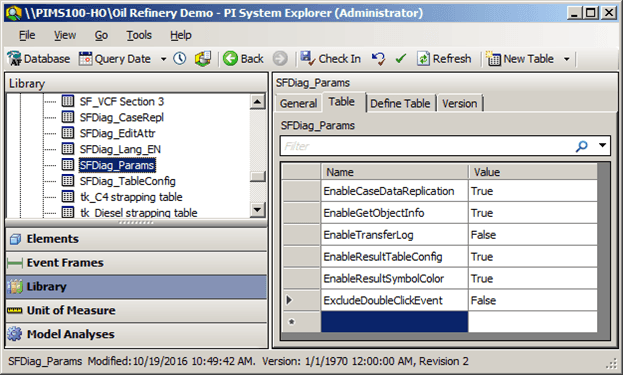
The following table explains the standard SFDiag_Params table function parameters and their settings. If a parameter is not present in the table, there are two possibilities:
- The function is enabled with default settings
- The function is disabled
The following table lists all parameters and the available settings.
SFDiag_Params Table Parameters
| Parameter | Description |
|---|---|
| EnableCaseDataReplication | Enables or disables the functionality to replicate data from one Case to the next. If the parameter is not in the table, the corresponding button is not visible.Values are True or False; True indicating that the parameter is enabled for replication. |
| EnableGetObjectInfo | Enables or disables the functionality to get Case information for the elements in the model. If the parameter is not in the table, the corresponding button is not visible.Values are True or False; True indicating that the parameter is enabled for replication. |
| EnableResultSymbolColor | Enables or disables the functionality to apply colors or icons to symbols based on the configurations. If the parameter is not in the table, the corresponding button is not visible.Values are True or False; True indicating that the parameter is enabled for replication. |
| EnableResultTableConfig | Enables or disables the functionality to customize the SF-ADA Results Window. If the parameter is not in the table, the corresponding button is not visible.Values are True or False; True indicating that the parameter is enabled for replication. |
| ExcludeDoubleClickEvent | Enables or disables the functionality to show the custom editing settings. If the parameter is not in the table, the default value is true such that the double-click action is disabled.Values are True or False; True indicating that the parameter is enabled for replication. |
| EnableClearAllAdjustments | Enables or disables the 'Clear All Adjustments' option when you right click a row in the “Properties for Element” window.If the parameter is not in the table, the default value is set to False and the option is not visible when a row is right-clicked. |
| CaseDataReadMethod | Integer that can be set to the following values that specify which set of data is used to load data result table:0: Values displayed are evaluated from raw data or from the adjusted ones. This is the default value if a value if missing.1: Values displayed are taken from Results tab of Case Properties. If entry is missing in this table, then value is evaluated according to the previous rule;2: Values displayed are only taken from Results tab of Case Properties. If entry is missing in this table, “No Data” is displayed instead of the value.This functionality is useful to improve performance problem related to not-compressed data (COM connector for example) as explained under ‘Best Practices’ section. |
| CaseWorkFlow_TagName | Existing tag name. The tag name can be set as a fixed string or as a parametric string. The parameters can be associated with AF databases, models, analysis and must be specified between % signs while there are no other specific settings for sign or strings.EXAMPLE:%Database%::%Model%::%Analysis%.WorkflowThe tag will receive the value corresponding to the AF operation with the timestamp of the start-time of the case. The available values are: Created, CollectElement, CollecTransfer, CollectInput, Reconcile, Closed. |
| ExecCommand | If present, it contains the command (path and name of the exe file) that must be executed when this button is pressed. For example, to open Pimsoft Data Importer using this button, configuration must be:Name: ExecCommandValue: “C:\Program Files(x86)\Pimsoft\Bin\Pimsoft.DataImport.exe” |
| EnableEditDataTable | Enable or disables the ability to edit values of the DataTable Attributes type.Values are True or False; True indicating that the values can be edited. |
| DataTableNumberFormat | String Nx.It allows you to specify how many digits you want to see after the decimal point, by setting the number of digits following the 'N'. The same setting is applied for all the columns of the data table.EXAMPLES:N0 - would indicate no decimal places (an integer).N1 - would indicate only 1 decimal place (one digit after the decimal).N2 - would indicate only 2 decimal places (two digits after the decimal). |
| TransferNamingConvention | Defines the transfer naming convention with a placeholder to define the date and counter.PlaceholderYYYY - Year of Case start timeMM - Month of the Case start timeDD - Day of the Case start timeN - CounterEXAMPLE:TR^YYYYMMDD-N With this syntax the transfer name will be:TR^20150414-1TR^20150414-2TR^20150414-3…. |
| MandatoryAdjustmentComment(ADA 4.7 SP1 and later ONLY) | Enables or disables the adjustment comment field as a mandatory field when an attribute value is changed through Edit Element Attribute.Values are True or False; True indicating that the adjustments comments field is required. |