Configure Ad Hoc Trend Settings
The Sigmafine Ad Hoc Trend settings are saved in the PI AF Database, in the Attributes template configuration. This is done by adding specific Attribute categories to the Attribute using System Explorer.
To customize Ad Hoc Trend settings through System Explorer:
In the navigation pane, click on Library to open the Library list.
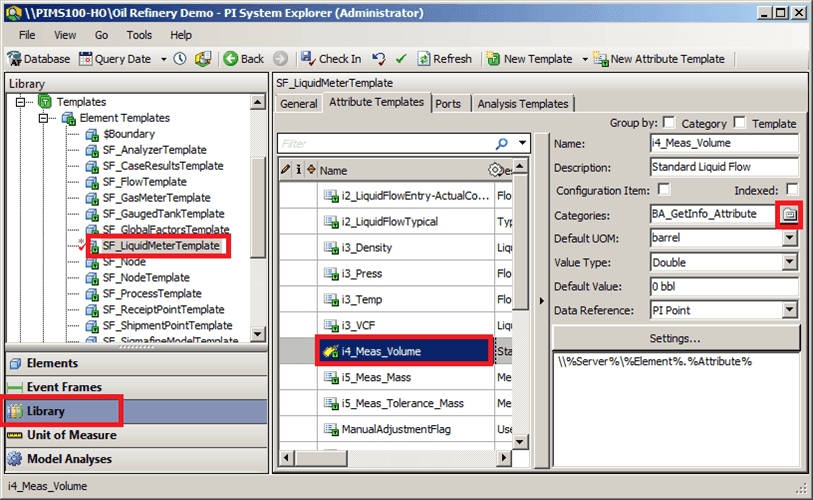
In the Library list, click on Templates to expand the tree.
Click on Element Templates to expand that tree.
Locate an select the template that contains the Attribute you want to customize.
The tabs for that specific Attribute display in the window (as shown in ).
Click on the Attribute Templates tab, then select the Attribute you want to customize.
The attribute's settings display in the window (as shown in ).
Click on the Categories button.
The Categorize window opens.
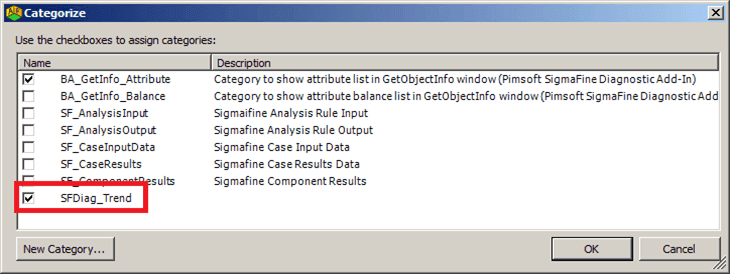
The Categorize window displays all the categories for the selected attribute.
Note: The attribute, for which a category is being configured, must itself be configured as a PI Point Data Reference in order to be useful.
To select a category, check its checkbox.
To deselect a category, uncheck its checkbox.
To create a new category, click the New Category button to open another window in which you can define the new category.
When finished with your customizations, click OK to save then and close the Categorize window.
To have your changes applied, you need to check them in (Check-In).