Create Display
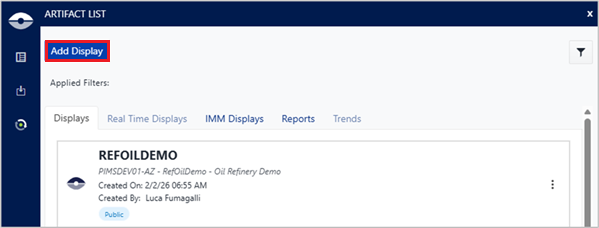
A new display is created by clicking the “Add Display” button and selecting the 'Create' tab.
When creating a new display, the display name is mandatory and the display description is optional.
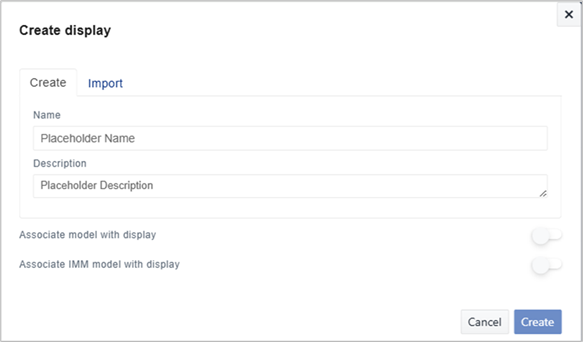
Display with duplicated names cannot be created unless you are creating display bound to different versions of the same Model.
The create display dialog allows to create three types of display:
- Sigmafine (AF) Display
- Sigmafine IMM Display
- Whiteboard Display
Sigmafine (AF) Display
A Sigmafine (AF) display is a traditional Sigmafine display bound to a Sigmafine Server, database and Model.
It is created by switching on the ‘Associate model with display’ toggle button.
The Sigmafine browser opens and allows navigating through Sigmafine Servers, Databases and Model for selecting the one to be affixed to the display. Then, the Model’s version is selected to complete the display creation.
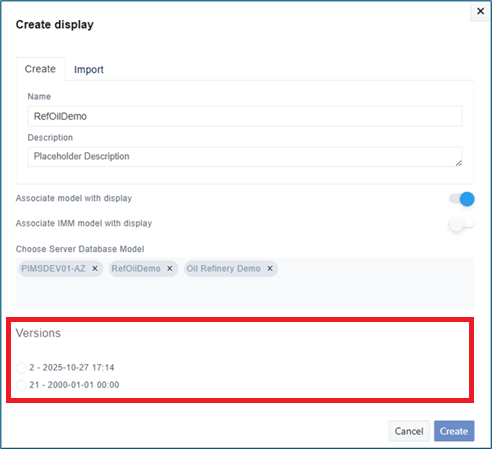
Each model version listed in the dialog shows two information:
- the model revision number, and
- the effective date and time.
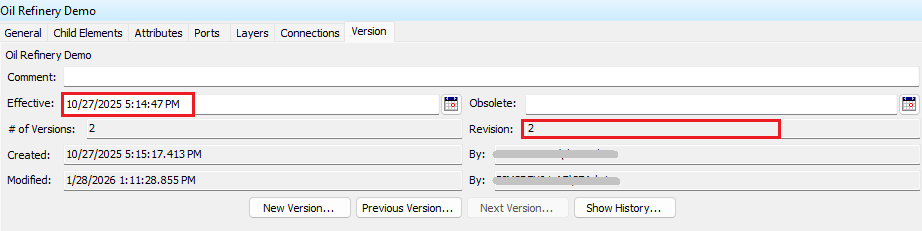
Displays with the same name are allowed when bound to different Model versions.
Sigmafine IMM Display
A Sigmafine IMM display is an IMM display bound to a Sigmafine IMM Server, database and Model. IMM Displays are used to visualize and manage IMM transfers data stored in a Sigmafine IMM database.
It is created by switching on the ‘Associate IMM model with display’ toggle button.
The Sigmafine browser opens and allows navigating through Sigmafine Servers, Databases and Model for selecting the one to be affixed to the display. Then, the Model’s version is selected to complete the display creation.
When creating an IMM display, ensure you select the latest model version to maintain compatibility with the IMM Server's real-time data operations. IMM Server functionalities may not be fully supported in previous model versions because it always uses the current date and time as query date on AF data.
Whiteboard Display
A Whiteboard display is not bound to a Sigmafine Server, database and Model by leaving both the toggles off.