View Layers
To view the layers of a Sigmafine Model or Display:
Click on Layers in the bottom bar.
By selecting the Layers option, you can see the list of the Layers configured in the display and model (as shown in the following figure).
Display with Layers option open
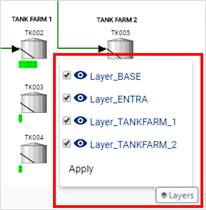
By default, all layers that are active in the case are shown in the display. Though once you select to hide a layer, it remains hidden in the selected display and will be removed from the case, unless someone selects to show the layer again.
NoteWhen you change the view of one or more layers in a display, it becomes the new default for everyone that views that display.