Share Publicly
To share your project with every SigmafineHub user at your company, you use the 'public' share feature. This feature automatically allows them to see and open the project and by default, assigns them all access permissions (read, write, execute, delete and share) to the project. Using this option, you can still control access rights at the components (Analytics, Reports and Workflows) level by setting individual rights for each component (Analytic, Report and Workflow) level, and you can also set individual rights for each analytic, report and workflow that you create in your project.
To publicly share your project:
Click the
 vertical ellipsis in the top-right corner of the project block,
to open the Project quick menu.
vertical ellipsis in the top-right corner of the project block,
to open the Project quick menu.Assign Public access
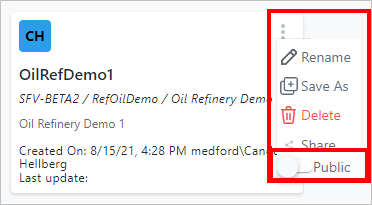
Click on Public to enable the Public option.
As you click, the slider moves to the right and turns blue (as shown in the following image); indicating that Public access is now enabled for this project.
Public access selected
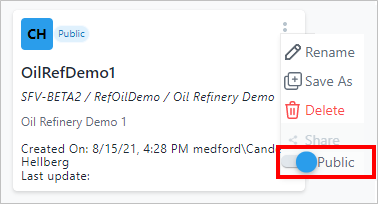
The quick menu disappears and the project shows a "Public" tag (as shown in the following image) indicating that all SFHub Studio users have full permissions on it.
Project displayed with a "Public" tag
