PI/AF Connector
The PI/AF Connector is used to create connections between PI, AF and Sigmafine systems. Note that it is required in order to create a PI/AF Dataset. (For more information on the PI/AF Dataset see PI/AF Dataset.)
Note: The PI/AF Connector no longer supports AF1.x. If you are currently using this version, please upgrade your AF installation to AF2.x or greater, before attempting to create the connector.
In order to use the PI/AF Connector, the following libraries/software components must be installed on the machine running the Integration Framework Server:
- OSIsoft PI-SDK 1.3.6 or greater
- OSIsoft PI-AF (Asset Framework) 2.9.5 or greater
- Sigmafine 4.7
In addition, at least one server (PI or AF 2.9 server) must be configured in the registered server connections. If no libraries are installed or no servers are configured, then the PI/AF Connector will fail. Prior to configuring the PI/AF Connector, we strongly recommend that you test the libraries with a full PI and AF client installation in order to verify the connection.
Note: Verify that the Windows platform (x86 or x64) of the PI and AF libraries are installed and configured prior to installing and configuring Integration Framework and the PI/AF connector. In addition, ensure that the Integration Framework and PI and AF platforms are the same before proceeding, otherwise the PI/AF Connector will be unable to load the correct libraries.
The following table defines the PI/AF Connector supported direction, based on the system (PI, AF and Sigmafine) for which it is being configured.
Integration Framework PI/AF Connector supported systems and features
| System | Supported Direction | Notes |
|---|---|---|
| PI System | INPUT/OUTPUT | PI 3.4.x servers onlyObject managed: Tag values only |
| PI Asset Framework 2.9.5(Sigmafine 4.7) | INPUT/OUTPUT | Object managed:Elements (either with or without templates)Transfers(values only, no Attribute configuration: no DR settings)TablesAnalysesTemplate definitions are not supported. |
Defining 'PI/AF Connector' Parameters
When you add or edit a PI/AF Connector, a Configure PI window automatically opens. This is the window in which you are to define the connector's parameters.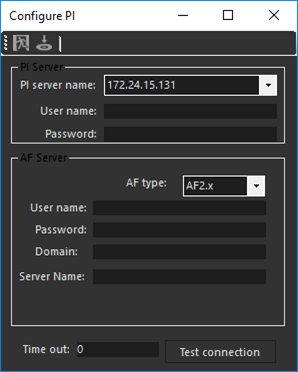
To define the PI/AF Connector parameters:
Use the following table as a guide in entering the parameters, based on the system for which you are configuring the connector.
Integration Framework PI/AF Connector connection parameters
System Parameter Mapping and Notes Common/General Parameters Set the following parameters as indicated and ensure that you test the connection:AF Type:PI System - Ignore this settingAF2.x - Use this option for AF 2.9.x systemsTimeout: The connection Time-out for the target system.Test Connection: Use this button to test the connection parameters in order to save meaningful values. PI System Ensure that you enter the following parameters:PI Server Name (one of the registered)Log in Credentials ( See the note below.)PI User namePasswordNote: If you leave both the 'User Name' and 'Password' boxes empty, Integration Framework attempts to connect to the specified PI System using the 'TRUSTED' connection. AF System 2.9 Ensure that you enter the following parameters:AF Type - Use this option for AF 2.9.x systemsWindows Credentials:User name (or Account name)PasswordDomainAF2.9.x Server Name **See the following note. Note:**The connector can be used to configure both PI and AF 2.9.x systems (reusing the same connector object to connect to both) should they be installed on the same machine.If PI and AF 2.x are installed on the same machine, set:PI 'Server Name' = PI server nameAF 2.x 'Server Name' = PI server name (basically, repeat the same setting)If the AF 2.x machine has no PI System installed, set:PI 'Server Name' = leave the box blankAF 2.x 'Server Name' = AF 2.9.x server name In the toolbar, click on the
 Test icon to test the connection.
In the toolbar, click the
 Save icon to save your parameter settings.