OLE Connector
The OLE Connector is used to connect any kind of OLEDB-enabled data source. It allows interaction with the following OLEDB objects:
- TABLES
- VIEWS
- STORED PROCEDURES
- COMMANDS (textual SQL statements sent directly to the engine)
In order to use an OLEDB Connector, the OLEDB provider and the system client libraries must be installed and configured on the machine running the Integration Framework Server, prior to configuring the Connector. For example, if you need to connect an Oracle server, the Oracle client with the Oracle OLEDB Provider must be installed and the TNS configuration must be tested, prior to defining the Integration Framework OLEDB Connector for the target Oracle server.
The following table provides a list of the OLEDB providers that have been tested with this version of Integration Framework.
Integration Framework OLEDB Connector supported systems and features
| OLEDB Provider | Support | Notes |
|---|---|---|
| Microsoft Office 12.0 Access Database Engine | INPUT/OUTPUTMicrosoft Access 2007 Microsoft Access 2010 | With or without Microsoft Access database security. Stored Procedures not supported. |
| Microsoft Jet 4.0 OLEDB Provider | INPUT/OUTPUTMicrosoft Access 2000 Microsoft Access 2003 | With or without Microsoft Access database security. Stored Procedures are not supported. |
| Oracle OLEDB Provider Microsoft OLEDB Provider for Oracle | INPUT/OUTPUTOracle Server 8.x Oracle Server 9.x Oracle Server 10.x | Supported only with a valid Oracle SID. |
| SQL Server family OLEDB Provider for SQLServer SQL Native Client SQL Native 10.0 | INPUT/OUTPUTSQL Server 2000 SQL Server 2005 SQL Server 2008 SQL Server 2016 | Supported either with or without an initial catalog/database. |
| ODBC | INPUT/OUTPUTAny certified Microsoft Windows ODBC provider | Supported either with or without an initial catalog/database. |
| MySQL | INPUT/OUTPUTMySQL 5.x | Supported only with an initial catalog/database. |
In order to connect to an OLEDB Data source ensure that you provide the following to Integration Framework:
- OLEDB Provider
- OLEDB Connection string parameters: The connection string is different for each OLEDB provider therefore, please see the specific documentation of the OLEDB provider in question.
Defining 'OLE Connector' Parameters
When you add or edit an OLE Connector, depending on the OLEDB Provider selected, the connector parameters for that Provider are displayed, as shown in the following figure in which displays the parameters for the 'SQLNCLI' Provider.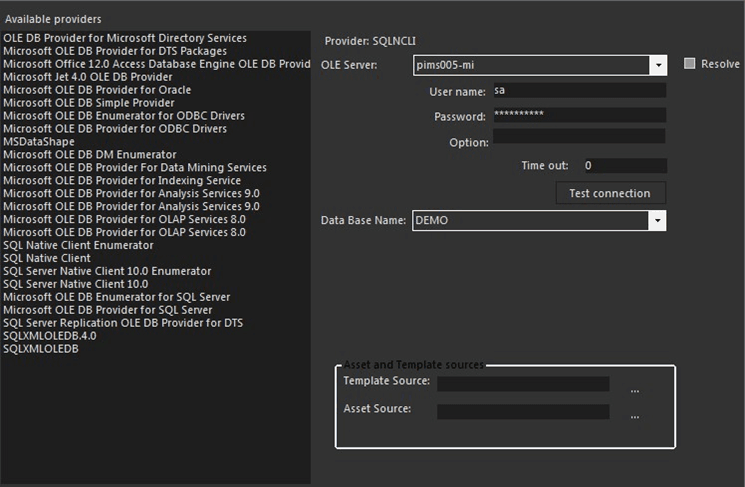
To define the OLE Connector parameters:
Use the following table as a guide in entering the parameters, based on the Provider for which you are configuring the connector.
Integration Framework OLE Connector connection parameters
OLEDB Provider Parameter Mapping and Description Common/General Parameters Depending the OLEDB Provider selected, the parameters may differ a little, therefore a specific guide is provided. However, some general parameters remain the same; they are listed here below:Timeout: The connection timeout for the selected external OLEDB provider.Resolve: Check this checkbox if you want to populate the OLE Server box list of selections with the already registered OLE servers or system DSNs over the machine running Integration Framework Server.Template Source: (this box is reserved for the future)Asset Source: (this box is reserved for the future)Test Connection: Use this button to test the connection parameters in order to save meaningful values. Microsoft Office 12.0Access Database Engine Enter the parameters as follows:Database Path: Full path to the .ACCDB fileDSN: (leave this box empty)User name: Access Account (See Access security model) (See the note below.)Password: Access Account Password (See the note beow.)Option: (leave this box empty)Note: *If no security Model implemented in the Access database, leave empty both fields. Microsoft Jet 4.0 OLEDB Provider Enter the parameters as follows:Database Path: Full path to the .MDB fileDSN: (leave this box empty)User name: Access Account (see Access security model) See the note below.Password: Access Account Password (See the note below.)Option: (leave this box empty)Note: *If no security Model is implemented in the Access database, leave both the 'User name' and 'Password' boxes empty. Oracle OLEDB ProviderMicrosoft OLEDB Provider for Oracle Enter the parameters as follows:OLE Server: TNS name (See the note below.)User name: Oracle Account (see Oracle security model)Password: Oracle Account PasswordDatabase: Oracle SIDOption: (leave this box empty)Note: The TNS name list must be already configured and tested. SQL Server familyOLEDB Provider for SQLServerSQL Native ClientSQL Native 10.0 Enter the parameters as follows:OLE Server: SQL Server instance name. For SQL-DefaultInstance, it is the machine name, otherwise for SQL-Named-Instance, the composite name: MACHINE\INSTANCEUser name: SQL Server Account (see SQL Server security model) See the note below.Password: SQL Server Account PasswordDatabase: SQL Server Catalog/DatabaseOption: (leave this box empty)Note: The OLEDB Connector is limited to SQL Server Native security therefore, it does not implement SQL Server Windows Security. ODBC**Note: Use this option, only if there is no way in which you can use a native OLEDB Provider for the target system Requirements:Define a valid DSN (Data Source Name) inside the OBDC applet in the Windows Control Panel. The DSN must be configured according the following rules:Type: System DSNOptions: The default security Model of the ODBC system.Parameters for Excel:Database Path: Full path of the Excel workbook.DSN: Insert the DSN Name configured in the control panel.User name/Password/Option: (not used)Parameters for FoxPro:Database Path: Full path of the FoxPro database.DSN: Insert the DSN Name configured in the control panel.User name/Password: FoxPro credentials for the database.Option: (not used)Parameters for ISAM (indexed text files):Database Path: Full path of the input file.DSN: Insert the DSN Name configured in the control panel.User name/Password/Option: (not used) MySQL Enter the parameters as follows:OLE Server: MySQL machine nameUser name: MySQLAccount (see MySQL security model)Password: MySQL Account PasswordDatabase: MySQL catalogOption: (leave this box empty) In the toolbar, click the
 Save icon to save your parameter settings and close the Configure PI window.