View a Data Table
When viewing a result table that contains a lot of data associated with a single attribute (such as in the Composition Tracking result table), SF-ADA provides the capability to display the data for that attribute (as shown in the Figure 1070).
To view the data for a data table:
Click on the \<Data Table> cell for the Element attribute.
The \<Data Table> Value for: [Element Attribute name] opens.
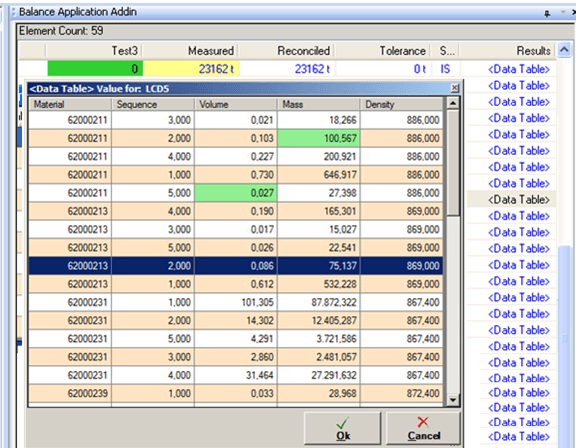
When the data table is viewed in this manner, you can make changes to the data as necessary.
(Optional) Edit the data as necessary, in the \<Data Table> window:
Select the current value in a cell.
Enter the new value.
If a value is edited the background becomes green as shown in Figure 1070.
Repeat steps 1 and 2 for each cell in which you need to change the data.
When finished making changes, click the OK button to save your changes and close the \<Data Table> window.
When finished viewing the data, click the Cancel button to close the \<Data Table> window.