Graphic Template
Each graphic entity contained in a display, is based on a specific Graphic Template where a graphic entity can be a basic one such as a text, a line, a generic icon or a complex one such as a Symbol used to represent Elementassets associated to Sigmafine Model’s Elements.
The Graphic Template is the common entity that encompasses all graphical entity properties used in a display.
By default, SFHub provides a set of standard Graphic Templates, organized in three categories:
- Prefab GT: Text, Line, Polyline, Ellipse, Circle, Rectangle, Triangle
- Prefab Sigmafine Connection GT: Polyline
- Icons: Extensive library of standard icons
Standard Graphic Template cannot be modified by users.
SFHub users can create and design their own Graphic Templates to define the graphical aspect of symbols referenced in Sigmafine Element templates. This Graphic Template consists of one or more Graphic Element that may refer to specific data source such as attributes, properties.
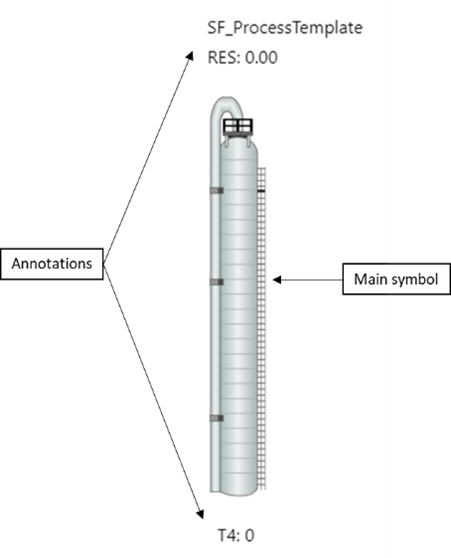
- The first Graphic Element is the main symbol, and it is typically not a Text.
- Additional Graphic Elements may be defined and are of type Text. These Graphic Element are used to visualize annotations both static and dynamic. Dynamic annotations are linked to specific data sources (attribute reference),
- Moreover, this type of Graphic Template supports animation. Animation is used to define dynamic action on each Graphic Element of the Graphic Template (modify some of the visual properties, typically the color, based on condition). An animation can apply to multiple Graphic Elements.
Below is an example of Graphic Template that refers to a Sigmafine Element template (SF_ProcessTemplate):