Use Variables
SFStudio supports the definition of variables at the analytic and element levels (see Set SFCodeBlock). Variables can be referenced in any expression and by specific SFCodeBlocks such as Print, Report and others.
The variable type is automatically detected by SFStudio, based on the statement that first defines it (assigned value). Currently, the following types are supported:
- Number
- String
- Element: element reference
- Boolean
- List
- Data Table
- Data Row
- Dictionary
- Element context
| Set SFCodeBlock Configuration | Assigned Type |
|---|---|
| $myVar = 'any string' | $myVar will be of type string |
| $myVar = 0 | $myVar will be of type numeric |
| $myVar = true | $myVar will be of type Boolean |
The following topics provide additional information.
Use Variables: Element Variable
An Element variable is a variable dedicated to an element. Every processed element will have its own set of variables (one instance for each element in the working space).
Variables whose names start with the $ (dollar) character are recognized by SFHub Studio as element variables.
Accessibility Domain
The accessibility domain of an Element variable specifies in which program sections a variable can be referenced.
If the variable is defined outside any nested SFCodeBlock, every SFCodeBlocks has access to it.
If a variable is defined in a nested SFCodeBlock, only the following SFCodeBlocks has access to it.
Since the Call statement does not support parameters, all variables accessible at the level of the CALL statement, are accessible only inside the FUNCTION.
That is, if the Set is located inside a ForEach loop, a While an If Then etc.. , the variable is accessible inside the SFCodeBlocks sequence and their nested ones. Variables defined inside a ForEach loop are associated to the for each element.
Syntax
The Element variable starts with the $ (dollar) character and should
not contain empty spaces.
| Good Names | Bad Names |
|---|---|
| $Counter | $ Counter |
| $ElementCount | $Element Count |
Use Variable: Analytic Variable
An Analytic variable is a global variable dedicated to the analytic. This means that only one instance of variable is allocated.
Variables whose names start with the $$ (double dollar) character, are
recognized by SFHub Studio as Analytic variables.
Accessibility Domain
Analytic variables have no accessibility restrictions and are in common with all elements processed by the Analytic. Moreover, Analytic variables are saved and made available for further scopes, such as Dashboard, etc.
Syntax
The Analytic variable starts with two $$ (dollar) characters and
should not contain empty spaces.
| Good Names | Bad Names |
|---|---|
| $$Counter | $$ Counter |
| $$ElementCount | $$Element Count |
Special Analytic Variables
SFHub Studio provides a set of analytic variables that allow you to generalize the logic implemented by the analytic itself.
| Analytic Variable Name | Description |
|---|---|
| $$Element | It contains the element context from which the analytic has been activated. |
| $$A_Name | Name of the Sigmafine Analysis of the selected Case. Following table summarize the allowed Sigmafine analysis names: |
| : Example of analysis names | |
 | |
| $$AA_Analysis Parameter alias | Set of Analytic variable aliases storing configuration information of the Sigmafine Analysis, where analysis parameter alias is the key string addressing the configuration parameter of the Sigmafine analysis. |
| For example, the analytic variable $$aa_metermeas contains the name of the meter measure mass attribute configured for the Analysis. |
The use of these Analytic variables, contributes to make your SFHub Studio Analytic more generic, avoiding referencing hard coded attribute names.
The following tables show the lists of available aliases for each Sigmafine analysis.
Variable Aliases: Component Mass Balance
| Alias | Parameter |
|---|---|
| $$aa_Component | ComponentsAttribute |
| $$aa_InferredStatus | InferredStatusAttribute |
| $$aa_LinearBalance | LinearizeParameter |
| $$aa_MeasInventory | InventoryMeasurementAttribute |
| $$aa_MeasInventoryCorrected | InventoryCorrectedMeasurementAttribute |
| $$aa_MeasMeter | MeterMeasurementAttribute |
| $$aa_MeasMeterCorrected | MeterCorrectedMeasurementAttribute |
| $$aa_MeasTransfer | TransferMeasurementAttribute |
| $$aa_MeasTransferCorrected | TransferCorrectedMeasurementAttribute |
| $$aa_QuantityUOM | UOM |
| $$aa_ReactionList | ReactionList |
| $$aa_RecComponent | ReconciledComponentNameAttribute |
| $$aa_RecCorrection | ReconciledCorrectionAttribute |
| $$aa_RecImbalance | ReconciledImbalanceAttribute |
| $$aa_RecInfluence | ReconciledInfluenceAttribute |
| $$aa_RecMeasurement | ReconciledMeasurementAttribute |
| $$aa_RecResidual | ReconciledResidualAttribute |
| $$aa_RecSolvability | ReconciledSolvabilityAttribute |
| $$aa_RecTest1 | ReconciledTest1Attribute |
| $$aa_RecTest2 | ReconciledTest2Attribute |
| $$aa_RecTest3 | ReconciledTest3Attribute |
| $$aa_RecTest4 | ReconciledTest4Attribute |
| $$aa_RecTolerance | ReconciledToleranceAttribute |
| $$aa_RecVariance | ReconciledVarianceAttribute |
| $$aa_SwitchResultsTables | SwitchResultsTablesParameter |
| $$aa_TolInventory | InventoryToleranceAttribute |
| $$aa_TolInventoryCorrected | InventoryCorrectedToleranceAttribute |
| $$aa_TolMeter | MeterToleranceAttribute |
| $$aa_TolMeterCorrected | MeterCorrectedToleranceAttribute |
| $$aa_TolTransfer | TransferToleranceAttribute |
| $$aa_TolTransferCorrected | TransferCorrectedToleranceAttribute |
Variable Aliases: Composition Tracking
| Alias | Parameter |
|---|---|
| $$aa_BalanceRule | BalanceRule |
| $$aa_BalanceType | BalanceType |
| $$aa_CompositionFlag | CompositionFlag |
| $$aa_CompositionInputPercentage | CompositionInpPercAttribute |
| $$aa_CompositionOutputPercentage | CompositionOutPercAttribute |
| $$aa_CompositionTracking | CompositionTrackingInputsAttribute |
| $$aa_CompositionTrackingDensity | CompositionDensityAttribute |
| $$aa_CompositionTrackingDiagnostic | CompositionDiagnosticAttribute |
| $$aa_CompositionTrackingImbalance | CompositionImbalanceAttribute |
| $$aa_CompositionTrackingQuality | CompositionQualityAttribute |
| $$aa_CompositionTrackingResult | CompositionTrackingOutputsAttribute |
| $$aa_DensityColumn | DensityColumn |
| $$aa_FlowDirection | FlowDirectionAttribute |
| $$aa_GlobalFactors | GlobalFactors |
| $$aa_Material | MaterialAttribute |
| $$aa_MaterialAccountingColumn | MaterialAccountingColumn |
| $$aa_MaterialColumn | MaterialColumn |
| $$aa_MaterialTable | MaterialTable |
| $$aa_MeasInventory | InventoryMeasurementAttribute |
| $$aa_MeasInventoryCorrected | InventoryCorrectedMeasurementAttribute |
| $$aa_MeasMeter | MeterMeasurementAttribute |
| $$aa_MeasMeterCorrected | MeterCorrectedMeasurementAttribute |
| $$aa_MeasTransfer | TransferMeasurementAttribute |
| $$aa_MeasTransferCorrected | TransferCorrectedMeasurementAttribute |
| $$aa_MixingModel | MixingModelAttribute |
| $$aa_ModelAnalysis | ModelAnalysis |
| $$aa_NormalizationAttribute | CompositionTrackingNormalizationAttribute |
| $$aa_QualityColumn | QualityColumn |
| $$aa_QuantityUOM | MassUOM |
| $$aa_RecCorrection | ReconciledCorrectionAttribute |
| $$aa_RecImbalance | ReconciledImbalanceAttribute |
| $$aa_RecMeasurement | ReconciledMeasurementAttribute |
| $$aa_RecResidual | ReconciledResidualAttribute |
| $$aa_RecSolvability | ReconciledSolvabilityAttribute |
| $$aa_SpecialMaterialColumn | SpecialMaterialColumn |
| $$aa_TolInventory | InventoryToleranceAttribute |
| $$aa_TolInventoryCorrected | InventoryCorrectedToleranceAttribute |
| $$aa_TolMeter | MeterToleranceAttribute |
| $$aa_TolMeterCorrected | MeterCorrectedToleranceAttribute |
| $$aa_TolTransfer | TransferToleranceAttribute |
| $$aa_TolTransferCorrected | TransferCorrectedToleranceAttribute |
| $$aa_VolumeUOM | VolumeUOM |
Variable Aliases: Energy Balance
| Alias | Parameter |
|---|---|
| $$aa_EnergyBalanceFlag | EnergyBalanceFlag |
| $$aa_EnergyUOM | EnergyUOM |
| $$aa_InferredStatus | InferredStatusAttribute |
| $$aa_MeasEnergy | EnergyMeasurementAttribute |
| $$aa_MeasInventory | InventoryMeasurementAttribute |
| $$aa_MeasInventoryCorrected | InventoryCorrectedMeasurementAttribute |
| $$aa_MeasMeter | MeterMeasurementAttribute |
| $$aa_MeasMeterCorrected | MeterCorrectedMeasurementAttribute |
| $$aa_MeasSpecificEnergy | SpecificEnergyMeasurementAttribute |
| $$aa_MeasTransfer | TransferMeasurementAttribute |
| $$aa_MeasTransferCorrected | TransferCorrectedMeasurementAttribute |
| $$aa_ObjectStatus | ObjectStatus |
| $$aa_QuantityUOM | QuantityUOM |
| $$aa_RecAdjustmentEnergy | ReconciledEnergyAdjustmentAttribute |
| $$aa_RecCorrection | ReconciledCorrectionAttribute |
| $$aa_RecImbalance | ReconciledImbalanceAttribute |
| $$aa_RecImbalanceEnergy | ReconciledEnergyInitialImbalanceAttribute |
| $$aa_RecInfluence | ReconciledInfluenceAttribute |
| $$aa_RecInfluenceEnergy | ReconciledEnergyInfluence |
| $$aa_RecMeasurement | ReconciledMeasurementAttribute |
| $$aa_RecMeasurementEnergy | ReconciledEnergyAttribute |
| $$aa_RecResidual | ReconciledResidualAttribute |
| $$aa_RecShellImbalance | ReconciledShellInitialImbalanceAttribute |
| $$aa_RecShellResidual | ReconciledShellResidual |
| $$aa_RecShellTest3 | ReconciledShellTest3Attribute |
| $$aa_RecShellTest4 | ReconciledShellTest4Attribute |
| $$aa_RecShellVariance | ReconciledShellVariance |
| $$aa_RecSolvability | ReconciledSolvabilityAttribute |
| $$aa_RecSolvabilityEnergy | ReconciledEnergySolvabilityAttribute |
| $$aa_RecSpecificEnergy | ReconciledSpecificEnergyAttribute |
| $$aa_RecSpecificEnergyAdjustment | ReconciledSpecificEnergyAdjustmentAttribute |
| $$aa_RecStatusEnergy | ReconciledEnergyStatusAttribute |
| $$aa_RecTest1 | ReconciledTest1Attribute |
| $$aa_RecTest1Energy | ReconciledEnergyTest1 |
| $$aa_RecTest2 | ReconciledTest2Attribute |
| $$aa_RecTest2Energy | ReconciledEnergyTest2 |
| $$aa_RecTest3 | ReconciledTest3Attribute |
| $$aa_RecTest3Energy | ReconciledEnergyTest3Attribute |
| $$aa_RecTest4 | ReconciledTest4Attribute |
| $$aa_RecTest4Energy | ReconciledEnergyTest4Attribute |
| $$aa_RecTolerance | ReconciledToleranceAttribute |
| $$aa_RecTubeImbalance | ReconciledTubeInitialImbalanceAttribute |
| $$aa_RecTubeResidual | ReconciledTubeResidual |
| $$aa_RecTubeTest3 | ReconciledTubeTest3Attribute |
| $$aa_RecTubeTest4 | ReconciledTubeTest4Attribute |
| $$aa_RecTubeVariance | ReconciledTubeVariance |
| $$aa_RecVariance | ReconciledVarianceAttribute |
| $$aa_RecVarianceEnergy | ReconciledEnergyVarianceAttribute |
| $$aa_SelfCalculatingFlag | SelfCalculatingFlag |
| $$aa_SpecificEnergyUOM | SpecificEnergyUOM |
| $$aa_TolEnergy | EnergyToleranceAttribute |
| $$aa_TolInventory | InventoryToleranceAttribute |
| $$aa_TolInventoryCorrected | InventoryCorrectedToleranceAttribute |
| $$aa_TolMeter | MeterToleranceAttribute |
| $$aa_TolMeterCorrected | MeterCorrectedToleranceAttribute |
| $$aa_TolSpecificEnergy | SpecificEnergyToleranceAttribute |
| $$aa_TolTransfer | TransferToleranceAttribute |
| $$aa_TolTransferCorrected | TransferCorrectedToleranceAttribute |
Variable Aliases: Mass Balance
| Alias | Parameter |
|---|---|
| $$aa_InferredStatus | InferredStatusAttribute |
| $$aa_MeasInventory | InventoryMeasuredMassAttribute |
| $$aa_MeasInventoryCorrected | InventoryCorrectedMassAttribute |
| $$aa_MeasMeter | MeterMeasuredMassAttribute |
| $$aa_MeasMeterCorrected | MeterCorrectedMassAttribute |
| $$aa_MeasTransfer | TransferMeasuredMassAttribute |
| $$aa_MeasTransferCorrected | TransferCorrectedMassAttribute |
| $$aa_QuantityUOM | UOM |
| $$aa_RecCorrection | ReconciledCorrectionAttribute |
| $$aa_RecImbalance | MassImbalanceAttribute |
| $$aa_RecInfluence | ReconciledInfluenceAttribute |
| $$aa_RecMeasurement | ReconciledMassAttribute |
| $$aa_RecResidual | ReconciledResidualAttribute |
| $$aa_RecSolvability | ReconciledMassSolvabilityAttribute |
| $$aa_RecTest1 | Test1Attribute |
| $$aa_RecTest2 | Test2Attribute |
| $$aa_RecTest3 | Test3Attribute |
| $$aa_RecTest4 | Test4Attribute |
| $$aa_RecTolerance | ReconciledToleranceAttribute |
| $$aa_RecVariance | MassVarianceAttribute |
| $$aa_TolInventory | InventoryMeasuredToleranceAttribute |
| $$aa_TolInventoryCorrected | InventoryCorrectedToleranceAttribute |
| $$aa_TolMeter | MeterMeasuredToleranceAttribute |
| $$aa_TolMeterCorrected | MeterCorrectedToleranceAttribute |
| $$aa_TolTransfer | TransferMeasuredToleranceAttribute |
| $$aa_TolTransferCorrected | TransferCorrectedToleranceAttribute |
Variable Aliases: Sigmafine Balance
| Alias | Parameter |
|---|---|
| $$aa_InferredStatus | InferredStatusAttribute |
| $$aa_MeasInventory | InventoryClosingMeasurementAttribute |
| $$aa_MeasInventoryOpening | InventoryOpeningMeasurementAttribute |
| $$aa_MeasMeter | MeterMeasurementAttribute |
| $$aa_MeasTransfer | TransferMeasurementAttribute |
| $$aa_ObjectStatus | ObjectStatusAttribute |
| $$aa_QuantityUOM | UOM |
| $$aa_RecCorrection | ReconciledCorrectionAttribute |
| $$aa_RecImbalance | ReconciledImbalanceAttribute |
| $$aa_RecInfluence | ReconciledInfluenceAttribute |
| $$aa_RecMeasurement | ReconciledMeasurementAttribute |
| $$aa_RecResidual | ReconciledResidualAttribute |
| $$aa_RecShellImbalance | HeatExchangerShellReconciledImbalanceAttribute |
| $$aa_RecShellResidual | HeatExchangerShellReconciledResidualAttribute |
| $$aa_RecShellTest3 | HeatExchangerShellReconciledTest3Attribute |
| $$aa_RecShellTest4 | HeatExchangerShellReconciledTest4Attribute |
| $$aa_RecShellVariance | HeatExchangerShellReconciledVarianceAttribute |
| $$aa_RecSolvability | ReconciledSolvabilityAttribute |
| $$aa_RecTest1 | ReconciledTest1Attribute |
| $$aa_RecTest2 | ReconciledTest2Attribute |
| $$aa_RecTest3 | ReconciledTest3Attribute |
| $$aa_RecTest4 | ReconciledTest4Attribute |
| $$aa_RecTolerance | ReconciledToleranceAttribute |
| $$aa_RecTubeImbalance | HeatExchangerTubeReconciledImbalanceAttribute |
| $$aa_RecTubeResidual | HeatExchangerTubeReconciledResidualAttribute |
| $$aa_RecTubeTest3 | HeatExchangerTubeReconciledTest3Attribute |
| $$aa_RecTubeTest4 | HeatExchangerTubeReconciledTest4Attribute |
| $$aa_RecTubeVariance | HeatExchangerTubeReconciledVarianceAttribute |
| $$aa_RecVariance | ReconciledVarianceAttribute |
| $$aa_SelfCalculatingFlag | SelfCalculatingFlagAttribute |
| $$aa_TolInventory | InventoryToleranceAttribute |
| $$aa_TolMeter | MeterToleranceAttribute |
| $$aa_TolTransfer | TransferToleranceAttribute |
| $$aa_UsePreviousCase | UsePreviousCase |
Variable Aliases: Volume Balance
| Alias | Parameter |
|---|---|
| $$aa_InferredStatus | InferredStatusAttribute |
| $$aa_MeasInventory | InventoryMeasuredVolumeAttribute |
| $$aa_MeasInventoryCorrected | InventoryCorrectedVolumeAttribute |
| $$aa_MeasMeter | MeterMeasuredVolumeAttribute |
| $$aa_MeasMeterCorrected | MeterCorrectedVolumeAttribute |
| $$aa_MeasTransfer | TransferMeasuredVolumeAttribute |
| $$aa_MeasTransferCorrected | TransferCorrectedVolumeAttribute |
| $$aa_QuantityUOM | UOM |
| $$aa_RecCorrection | ReconciledCorrectionAttribute |
| $$aa_RecImbalance | VolumeImbalanceAttribute |
| $$aa_RecInfluence | ReconciledInfluenceAttribute |
| $$aa_RecMeasurement | ReconciledVolumeAttribute |
| $$aa_RecResidual | ReconciledResidualAttribute |
| $$aa_RecSolvability | ReconciledSolvabilityAttribute |
| $$aa_RecTest1 | Test1Attribute |
| $$aa_RecTest2 | Test2Attribute |
| $$aa_RecTest3 | Test3Attribute |
| $$aa_RecTest4 | Test4Attribute |
| $$aa_RecTolerance | ReconciledToleranceAttribute |
| $$aa_RecVariance | VolumeVarianceAttribute |
| $$aa_TolInventory | InventoryMeasuredToleranceAttribute |
| $$aa_TolInventoryCorrected | InventoryCorrectedToleranceAttribute |
| $$aa_TolMeter | MeterMeasuredToleranceAttribute |
| $$aa_TolMeterCorrected | MeterCorrectedToleranceAttribute |
| $$aa_TolTransfer | TransferMeasuredToleranceAttribute |
| $$aa_TolTransferCorrected | TransferCorrectedToleranceAttribute |
The analysis parameter names are visible in the serialized string of the analysis configuration recorded in the AF Server, based on the following format:
<analysis parameter>=value
Example of Analytic variable configuration
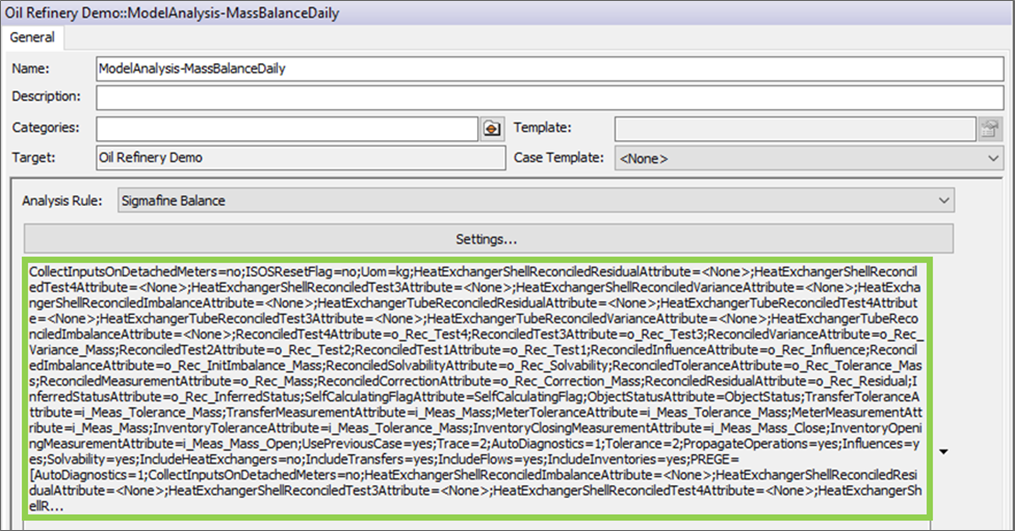
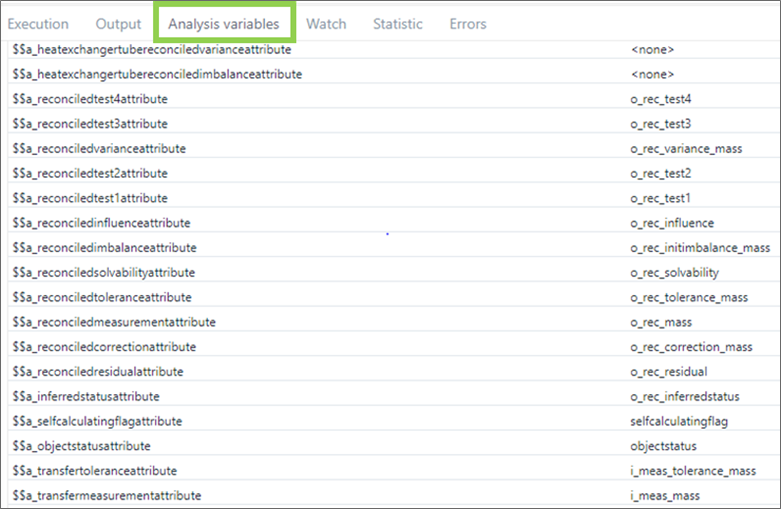
Optionally, SFHub Studio developers could have an overview of the analysis parameter aliases selecting the Analytic variables tab of the SFHub Studio Debug window.
Analytic Variable Aliases - Analysis Parameters
Manage Concurrent Access to Variables
By default, the programmed logic in a SFHub Studio analytic is applied in parallel to all elements contained in the input Working Space, acting as a program that runs in parallel against each individual element.
Concurrent access (read and write) to an analytic variable deals with a concurrent programming mode.
SFHub Studio provides a programming statement (InterlockedOperator), allowing you to change a variable value in safe mode. (Please see the InterlockedOperator in SFHub Expressions for detailed information.)
Use Interface Variables
Interface variables belongs to the Analytic variables. They differ from standard analytic variables, as they are exposed (made public) inside SFHub acting as dynamic parameters.
Interface variables are declared in SFHub Studio Analytics using the 'Interface' code block (see Interface under SFCodeBlocks Reference) and they can be used by the SFHub Studio Analytics to get data from the Sigmafine Case in a dynamic way, based on the Interface configuration.
The use of Interface variables inside an analytic requires designing the logic of the analytic in the proper way, to correctly implement what is required through the interface.
UOM TYPE INTERFACE
Let's assume we want to fill a SFHub Table with the mass value of all the tank and we would like to make parametric the unit of measure used to get the tank mass value.
Example: Interface variable of Type 'UOM'
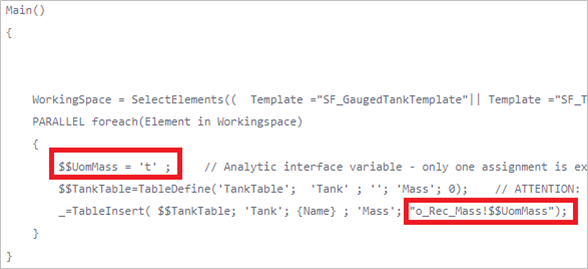
The following example shows how to declare and use an Interface variable of Type 'Uom' that the analytic use to get the tank mass value.
| Interface - SFCodeBlock | Transcription |
|---|---|
 |  |
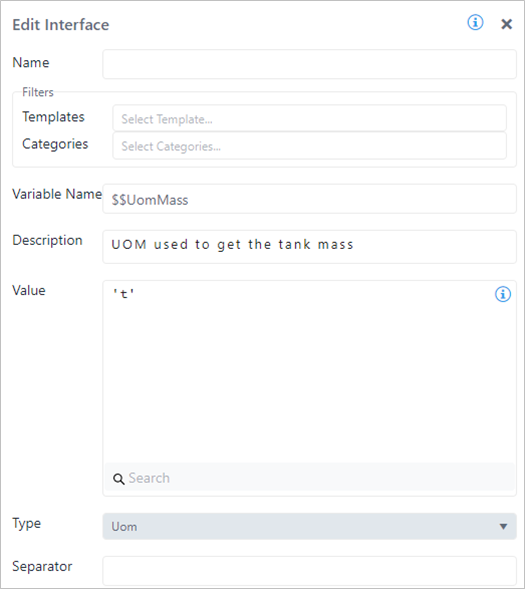
The Interface variable is named $$UomMass and its default value is
initialized by a string containing the default uom (t) used to get the
tank mass value. The Type parameter is set equal to 'Uom' to qualify an
interface variable intended to be used as a unit of measure parameter.
Interface SFCode Block configuration panel
The Interface variable is then used by the analytic to reference the
tank attribute using the UOM operator qualified by the Interface
variable $$UomMass
Interface variable UOM - Extended Notation
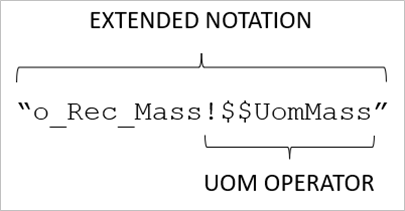
(See the SFHub Element Attributes paragraph in SFHub Expressions User Guide for more details.)
Attribute Type Interface
Let's assume we want to make parametric and then dynamic the content of the SFHub Table to be filled by the tank attribute values (Tank name and tank mass columns shown in the previous example are still keep as fixed columns of the table).
Example: Interface of Type 'Attributes'
The following example shows how to declare and use an Interface variable of Type 'Attributes' that the analytic uses to get the tank attributes values, as well as create the SFHub Table with dynamic columns based on the Interface.
In order to manage in a proper way this situation it is required to make a lot of changes to the previous example:
Interface of Type 'Attributes'
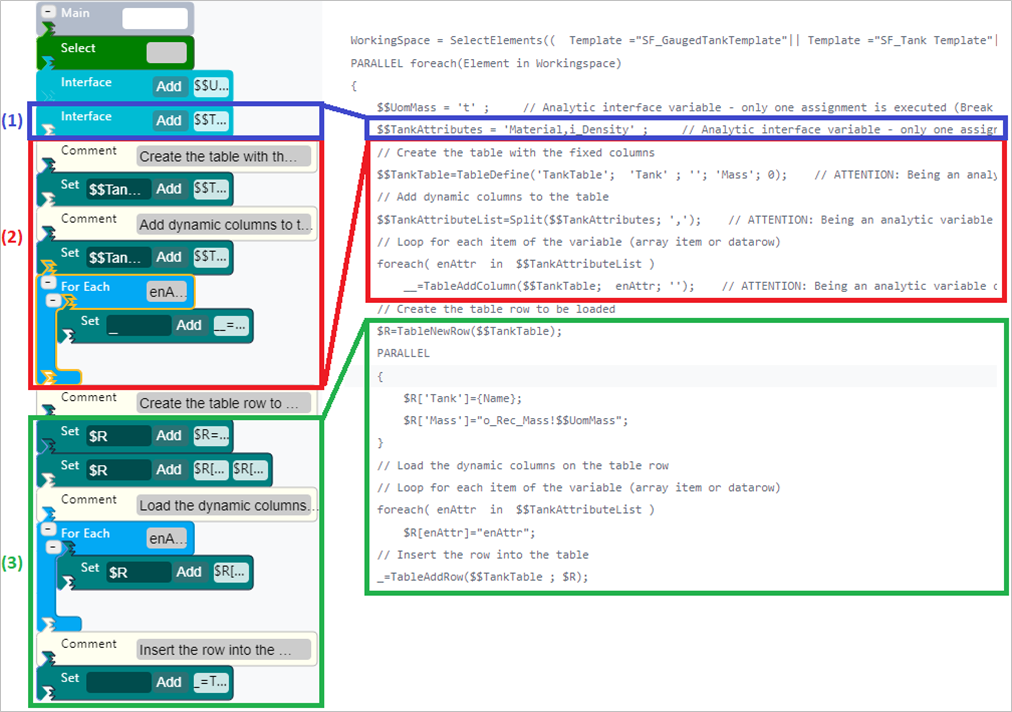
Referring to the example, the following are the steps we took.
Step 1 - Interface Declaration
We added a new Interface variable named $$TankAttributes. Its default
value is initialized by a string containing the default value of the
dynamic attribute list (\'Material,i_Density\') used to get the tank
attribute values. The Type parameter is set equal to 'Attributes' to
qualify an interface variable intended to be used as attributes
parameter.
Interface - Edit Interface configuration panel
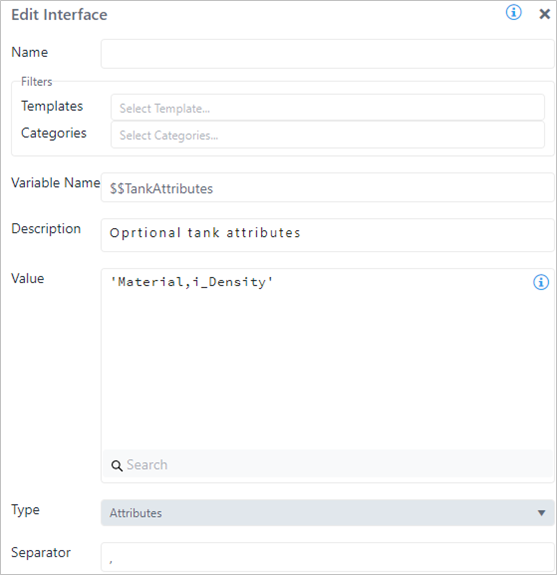
In this case, the Interface code block needs to be qualified by the separator character of the attribute list.
Step 2 - Table Creation
We then needed to create a table with a dynamic number of columns that
are qualified by the Interface variable $$TankAttributes.
We used the TableDefine function to create a table with the fixed
columns that we would like to keep in the data table (Tank and Mass);
then use the TableAddColumn function to add the dynamic columns
according to the $$TankAttributes interface variable.
Since the $$TankAttributes interface variable exposes a string
containing a comma separated list of attributes names, we need to create
an SFHub List ($$TankAttributeList) that can be used to enumerate the
attribute name through the For Each code block. For this purpose, we
used the Split string function, to transform the content of the
$$TankAttributes interface variable to a SFHub List
($$TankAttributeList).
$$TankAttributeList=Split($$TankAttributes; ',')
The For Each loop over the $$TankAttributeList is used to iterate on
the column name collection, and create the dynamic columns.
__=TableAddColumn($$TankTable; enAttr; '')
The TableAddColumn accepts the use of the enumerator variable, to quality the column name parameter.
Step 3 - Table Fill
As with the table creation, we had to fill the table columns previously
created, based on the dynamic columns that are qualified by the
Interface variable $$TankAttribute.
In this context, we could not use the TableInsert function as we did in the first example, because it cannot be used to qualify a dynamic list of columns. Therefore, for the purpose on this example, we used the TableNewRow table function to allocate an element variable containing the table row.
$R=TableNewRow($$TankTable)
The table row variable ($R) is declared as element variable since it
is dedicated to store the attribute values of each single tank falling
in the analytics' working space.
The table row variable ($R) can be used to fill each single column and
the fixed columns, as well as the dynamic columns, using the For Each
loop over the $$TankAttributeList.
$R[enAttr] = “enAttr”
The table row variable ($R) accepts the use of the enumerator variable
to quality the column name. In addition, the enumerator variable can be
used in an element attribute extended notation.
Once the table row variable has filled in all its columns, the $R
element variable is used to add the new row to the SFHub Table:
_ = TableAddRow($$TankTable; $R)
The element discard variable is used to guarantee that the TableAddRow is executed for each tank falling in the analytic's working space.
Variable Limitations
Current limitation in Version 1.6
- Indexed variables -- Index cannot be expressed with expressions
Valid formats
$Total[$Material]
$Total[0]
$Total["material"]
Invalid formats
$Total[0 + 1]
$Total[$Index + 2]