Use the Set SFCodeBlock
The Set SFCodeBlock is probably the most common and useful code block in an analytic, as it allows you to assign values to variables. The result of an assignment expression is the value assigned to the left-hand operator (the variable). The type of the variable is determined by the assigned value. See the Aggregation topics for additional details.
Simple Aggregation Totalization
Create a simple analytic calculating the total tank mass, and print-out the calculated total.
In this example we will see:
How to narrow the working space to the tank only (Select code block)
How to declare an analytic variable where to store the total (Set code block)
How to use an analytic variable with the InterlockedOperator to totalize the tank mass
How to print-out the content of the variable (Debug.Print)
The correct approach, is to use the InterlockedOperator function that performs safe totalization over the Analytic variable storing the total.
Aggregation: Totalization - example
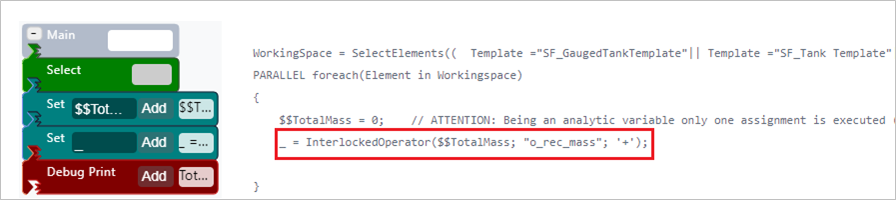
Using the Totalization Function
_ = InterlockedOperator($$TotalMass ; "o_rec_mass" ; '+')
Notice that the discard element variable is used "_", instructing SFHub to evaluate the expression for each element amongst those contained in the Working Space.
Please refer to the SFHubExpressions guide for more information.
In the example given, we can also see:
How to narrow the working space to the tank only (Select code block)
Using the Select SFCodeBlock we will optimize the analytic execution to the tank only that are in the scope of the analytic.
Using Select code block to narrow working space to "Tank" only

How to declare an analytic variable in which to store the total (Set code block)
'$$TotalMass = 0'
The numeric type has been assigned to the analytic variable.
Using Set to declare the variable to store the total

Grouped Aggregation Totalize by Key
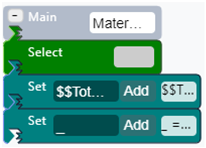
The Simple Totalization analytic is now extended to totalize the tank mass by material and print-out totals; the material code used for this aggregation is taken from the tank Material attribute. Since a single numeric analytic variable is no longer sufficient for the scope, we use a more complex variable, suitable to record multiple values.
Similar to the Totalization example, the InterlockedOperator function is used to perform safe totalization over the analytic variable of type SFHub Dictionary storing the totals by material.
| Set Code Block - Totalize by Key | Code Transcription |
|---|---|
 | 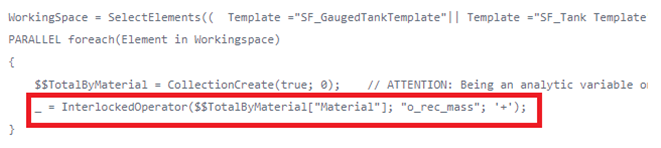 |
_ = InterlockedOperator($$TotalByMaterial["Material"]; "o_rec_mass"; '+')
Notice that the discard element variable is used "_", instructing SFHub to evaluate the expression for each element amongst those contained in the Working Space.
The reference to the variable to be changed by incremental operator '+' is qualified using the SFHub Dictionary variable and a key value represented by the value of the attribute Material ("Material")
In the example we can also see:
How to declare an analytic variable of type SFHub Dictionary where the totals by material are recorded (Set code block)
Totalize by Key - declaration of analytic variable of type SFHub Dictionary

'CollectionCreate' function has been used to create the SFHub Dictionary containing numeric values (See SFHub Dictionary Function in SFHub Expressions Reference Guide document).
The SFHub Dictionary then contains the following values:
Results from SFHub Dictionary

Grouped Aggregation Using Patterns Totalize by Key
The Totalize by Key analytic is now organized in a different way, in order to totalize the tank mass by material as well as to totalize the flow mass by material. In this example the 'Select' SFCodeBlock has been removed and we will use the pattern feature applied to the 'Set' code block to perform two different totalizations.
| Set Code Block - Totalize by Key using patterns | Code Transcription |
|---|---|
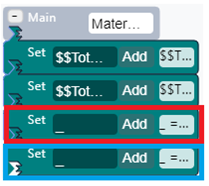 | 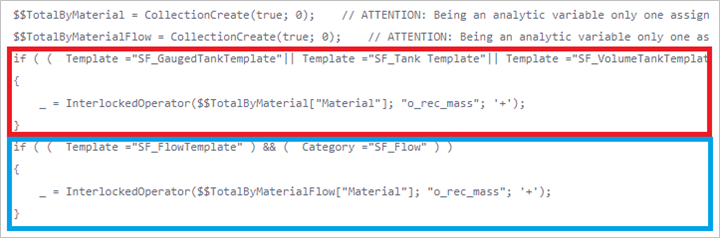 |
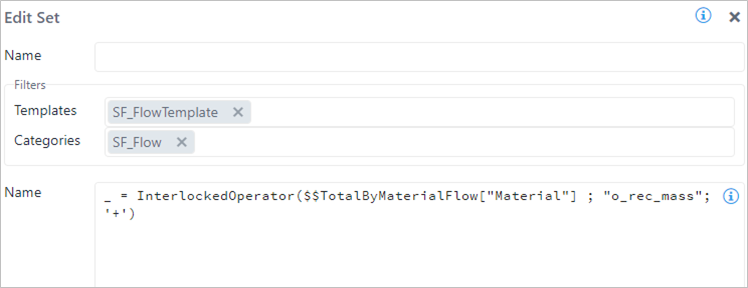
In Figure 3 and Figure 4, you can see in detail how the two patterns are configured to process the totalization for flow materials and tank materials:
This is the 'Set' code block where the pattern is configured for the
SF_Flow element category. The totalization is then performed over the
dedicated analytic dictionary variable $$TotalByMaterialFlow.
Edit Set configuration panel settings for SF_Flow - example
This is the Set code block where the pattern is configured for the SF_Tank element category. The totalization is then performed over the dedicated analytic dictionary variable '$$TotalByMaterial'.
Edit Set configuration panel settings for SF_Tank - example
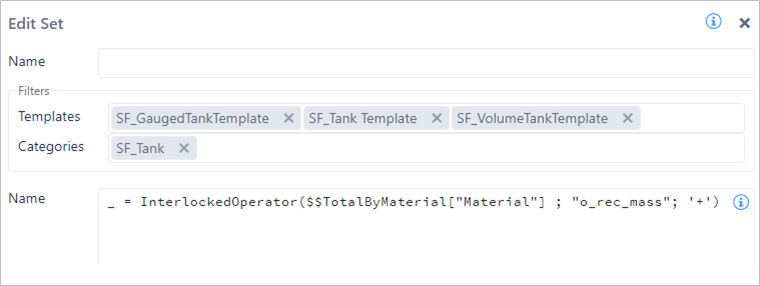
Notice that the discard element variable is used "_", instructing SFHub to evaluate the expression for each element among those contained in the Working Space and according to the pattern configured in each Set code block.
Aggregation of Complex Attributes: Totalize Attributes of Type Table
With SFHub Studio, you can create more structured aggregations using attributes containing complex data types like Data Table.
In the following example, we demonstrate how to totalize tank mass grouped by material using the material code and the mass recorded in composition tracking data table.
For the purpose of the example, below is a reminder composition tracking table format from which we will get the values:
Example of Composition Tracking Table

The TableCalc function is used to perform the aggregation of the
composition tracking table recorded in the attribute
'i_CompositionTrackingResults'. The output of the aggregation is then
recorded in the analytic variable $$TotalByMaterial of type
DataTable.
| Set Code Block - Totalize Attributes of Type Table | Code Transcription |
|---|---|
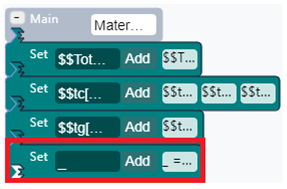 | 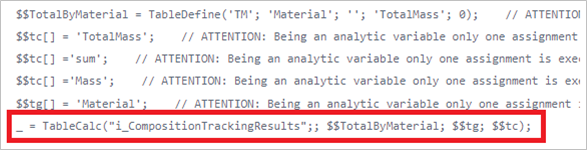 |
The InterlockedOperator is no longer required since the TableCalc bult-in function implements it implicitly.
In this example you can also see:
How to create a SFHub Table to store the totals by material (the output of the TableCalc).
Store output of the TableCalc code block and code
 info
infoThe table is made up of two columns: Material (string) and TotalMass (numeric).
How to create an initialize the parameters to be passed to the TableCalc function.
Both the parameters must be of type SFHub List.
Grouped by Parameter Initialization code block and code example

Qualify the column name of the source table containing the key values for the aggregation. We use the Material column for the purpose of this example.
infoIt is implicit that the destination table contains the same column name (Material).
Field Parameter Initialization
This is the list of calculations to be performed on the input table. Only one calculation is configured for the purpose of this example.
Grouped by Field Parameter Initialization code block and code example

$$tc[] = 'TotalMass'Qualify the column name of the destination table where the aggregated values are recorded.
$$tc[] = 'Sum'Qualify the aggregation rule (Sum in this example)
$$tc[] = 'Mass'Qualify the column name of the source table containing the values to be aggregated (totalized).