Use the Mutex Parameter
The SFHub Studio Analytic engine is able to optimize the execution of analytics when multiple users are requesting execution of multiple instances, of the same analytic, at the same time.
The execution of multiple instances of the same analytic occurs when the execution has been requested on the same context; where "same context" means:
Same Sigmafine Case and Case Status
Same Interface parameters
Same Element (when it applies)
If two different users are running the same analytic on different Sigmafine Cases, the execution context is different.
If two different users (User1 and User2) are running the same analytic on the same Sigmafine Case, but the Sigmafine Case is checked-out by the User2, the Case data is potentially different and therefore, the context is different as well.
Mutex (NULL)
When the 'Mutex' parameter of the analytic is set to NULL, it means that SFHub Studio will execute multiple concurrent instances of the same analytic, despite that they are requested on the same context.
Use Mutex Parameter - NULL
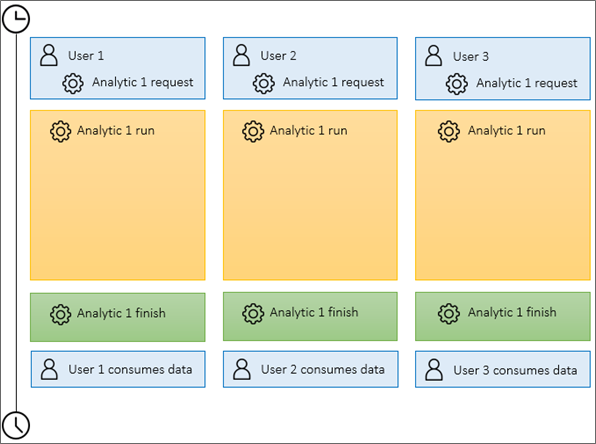
Running multiple concurrent instances of the same analytic in the same context affects the performances and then the execution elapsed time.
Mutex (QUEUE)
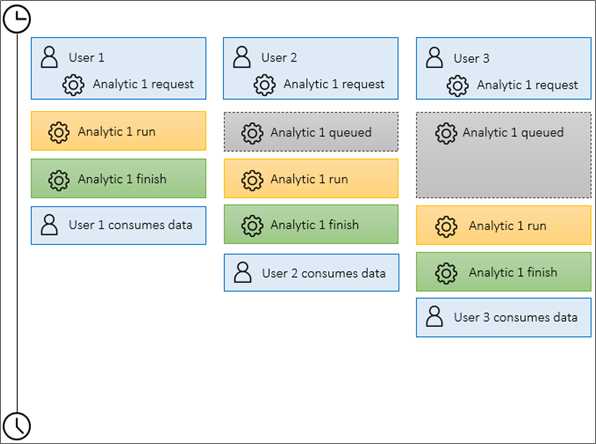
Using the 'QUEUE' option, the concurrent execution requests on the same context are queued and suspended, until the current instance of the analytics completes.
This approach introduces a first level of optimization where the execution is performed in sequence (less resource allocation than a simultaneous execution), and not all the users are penalized; the first user receives the data to be consumed earlier.
Use Mutex Parameter - QUEUE
Mutex (SYNC)
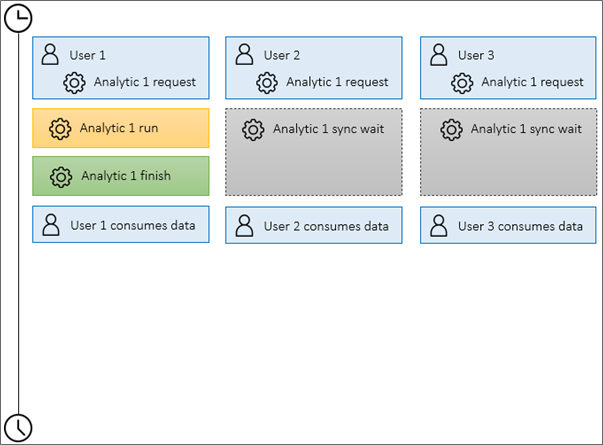
Using the 'SYNC' option, the concurrent execution requests on the same context are put in wait, until the first instance of the analytics completes.
This approach guarantees the best performances, since only one instance of the analytic is executed while the other ones stay in a sync wait. As soon as the first instances terminates successfully, the same data is dispatched to all the users.
Use Mutex Parameter - SYNC