Use Case Checkout and Case Checkin
When you are planning to develop a SFHub Studio analytic designed to make changes on a Sigmafine Case, it is best practice to use the Case Checkout and Case Checkin SFCodeBlocks.
The SFHub Studio engine takes care of carrying out an automatic Checkout of the Sigmafine Case even if the analytic makes a change to the Case without having made a previous explicit check out through the dedicated code block. This approach, as long as it is easy, however, has a disadvantage related to the lack of control over what is being done. A modification attempt could fail because the case is already blocked by someone else with consequent execution error of the analytic.
The best approach is to use the SFCodeBlock Case CheckOut which allows you to take control over the status of the Sigmafine Case and take the correct actions in case it is blocked by other users or errors occur during execution (in case of error, the Case UndoCheckout allows to maintain the consistency of the case in an equivalent way of a transaction).
Example: Using Case Checkout & Case Checkin
Using Case Checkout & Checkin to set tank mass value
This example shows that the SFHub analytic is designed to set the 'tank mass = 0' whenever the measured value is negative.
| Case Checkout & Checkin Code Blocks | Code Transcription |
|---|---|
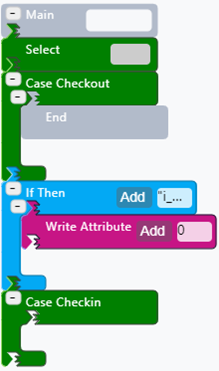 | 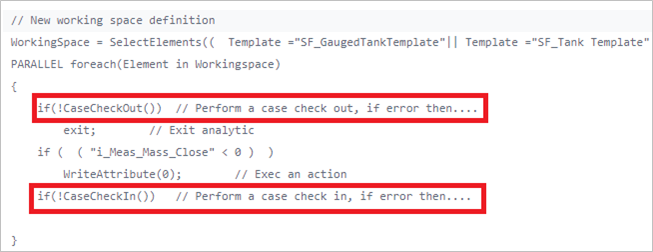 |
The Case Checkout SFHub code block is used to explicitly reserve the Sigmafine Case and interrupt the analytic in case of failure (End code block).
The Case Checkin is called at the end of the analytic to record the changes into the Sigmafine Case.