Use the For Each Code Block: Enumerator
The use of collections enumeration (For Each loop) has been used in previous examples, to print-out the content of collections. Here you can see more details in how it all works, and how the enumerator can be used to reference the enumerated item, as well as the use of the enumerator to print-out the content.
See the following For Each topics for additional information.
Use the For Each Code Block with SFHub List
The For Each loop (type Variable) can be used to enumerate the content of a variable of type SFHub List.
Example: For Each of Type Variable SFHub List
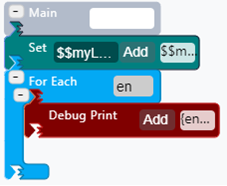
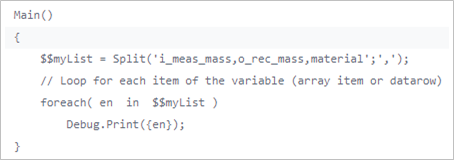
In this example, the SFHub List is created using the string Split
built-in function on a string literal that contains a sequence of
attribute names separated by the ',' (comma) character. The returned
List is enumerated to print-out its content. The For Each
(Type=Variable) is used to enumerate the SFHub List items recorded in
the analytic variable $$MyList and the Debug.Print is used to
print each recorded item.
| For Each Code Block - SFHub List | Code Transcription |
|---|---|
 |  |
Since the Debug.Print is executed for each element in the working space,
it is absolutely worthless to print the same value several times; for
this reason, we enable the below setting of the Debug.Print to print-out
only one instance of the message.
Set Debug Print to only one instance of the message

Based on the example, the output that appears in the SFHub Studio window is:
For Each - SFHub List - Debug Print Results

Use the For Each Code Block with SFHub Dictionary
The For Each loop (type Variable) can be performed on SFHub Dictionary variables. In this example, we extend the Totalize by Key example to show how to enumerate the print out of dictionary content.
Example: For Each of Type Variable SFHub Dictionary
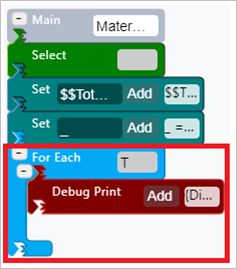
The For Each (Type=Variable) is used to enumerate the SFHub Dictionary
items recorded in the analytic variable $$TotalByMaterial. The
Debug.Print is then used to print each recorded pair of key and
value.
| For Each Code Block - SFHub Dictionary | Code Transcription |
|---|---|
 | 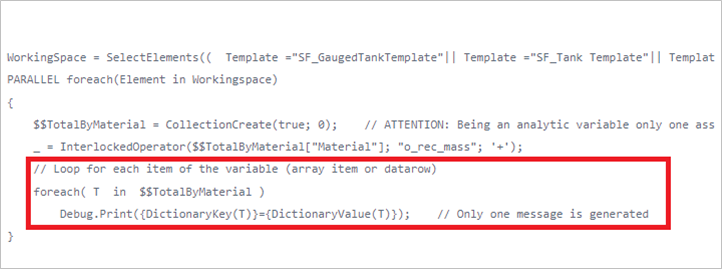 |
DictionaryKey(T) and DictionaryValue(T) functions allow to get the key
and the value from the enumerator variable (T) configured in the ForEach
loop.
The Debug.Print over the SFHub Dictionary produces the following output:

Use the For Each Code Block with SFHub Table AFTable and Attribute of Type Table
The For Each loop enumeration can be performed on SFHub Tables, as well as on any other kind of data tables. you can enumerate AF Tables and data tables recorded in attribute values (e.g., composition tracking table) as well.
Example: For Each Enumeration of SFHub Table
In this example we extend the Totalize Attributes of Type Table example
to show how to enumerate the SFHubTable rows and print out their
content. The For Each (Type=Attribute) is used to enumerate the SFHub
Table rows recorded in the analytic variable $$TotalByMaterial. The
Debug.Print is then used to print the two columns or each row.
| For Each Code Block - Table | Code Transcription |
|---|---|
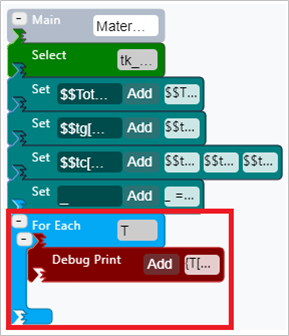 | 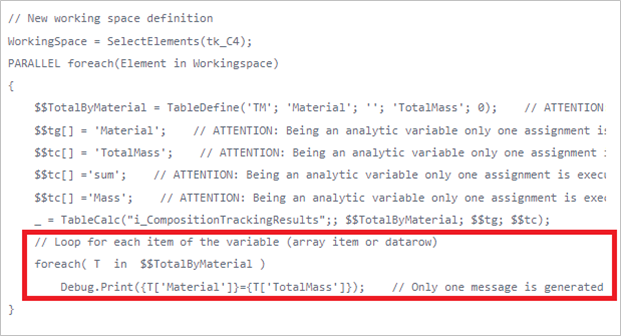 |
The T['Material'] and T['TotalMass'] expressions allow you to get
the column values from the enumerator variable (T) configured in the
ForEach loop.
Since the Debug.Print is executed for each element in the working space,
it is absolutely worthless to print the same value several times; for
this reason, we enable the below setting of the Debug.Print to print-out
only one instance of the message.
Set Debug Print to only one instance of the message
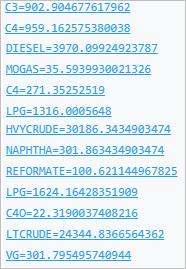
The Debug.Print over the SFHub Table produces the following output:
For Each - SFHub Table - Debug Print Results
Example: For Each Enumeration of AF Table
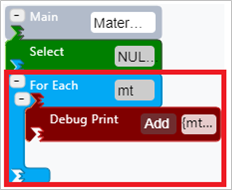
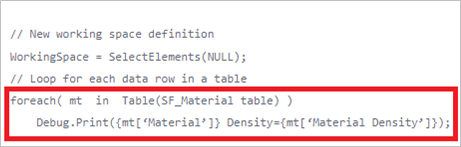
In this example, the For Each (Type= AFTable) is used to enumerate the SF_Material table and print-out the Material and the Material Density columns.
The For Each (Type=AFTable) is used to enumerate the rows recorded in
the SF_Material table and the Debug.Print is used to print the
Material and the Material Density columns values for each row.
| For Each Code Block - AF Table | Code Transcription |
|---|---|
 |  |
In Figure 7 you can see the details in the Fore Each code block configuration panel.
ForEach details in configuration panel
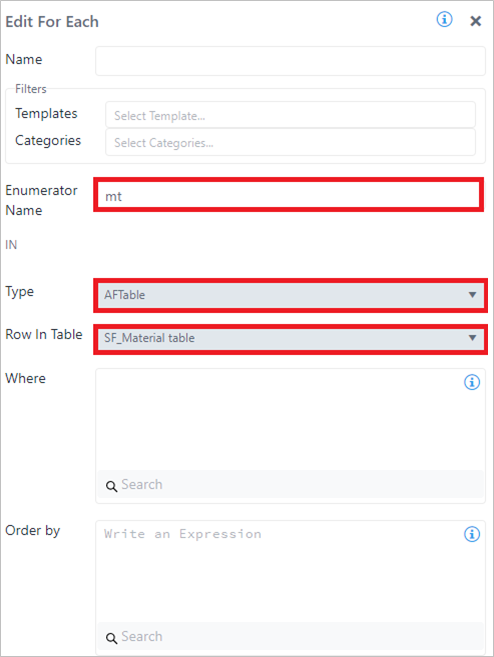
The ForEach code block is configured using Type = AFTable and then selecting the SF_Material table.
The inner Debug.Print to the ForEach loop is then used to print the
column values.
{mt['Material'']} Density={mt['Material Density'']}
The mt['Material'] and mt['Material Density'] expressions allow you
to get the Material and the Material Density column values from the
enumerator variable (mt) configured in the ForEach loop. The column
names are enclosed in single quotes.
In this example we have also seen:
How to set an empty working space (Select code block).
Using the Select SFCodeBlock (Select NULL) we optimize the analytic execution to an empty working space, since our scope is to work with the SF_Material table only.
Use SFCodeBlock Select set to NULL
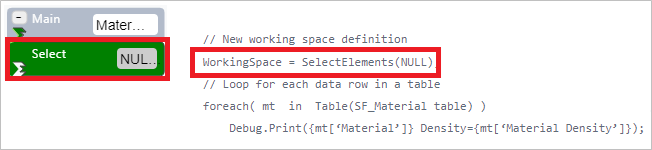
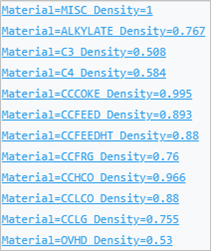
Based on this example, the output that appears in the SFHub Studio debug window is:
: For Each - AF Table - Debug Print Results
Example: For Each Enumeration of Attributes of Type Table
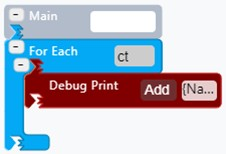
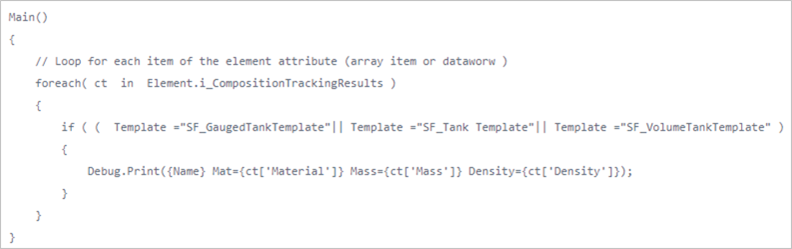
In this example we use the For Each (type Attributes) to enumerate the composition tracking table recorded in the attribute i_CompositionTrackingResults printing-out the Material, Mass and Density columns.
| For Each Code Block - Attribute of type Table | Code Transcription |
|---|---|
 |  |
In Figure 13 you can see the details in the For Each code block configuration panel.
: ForEach details in configuration panel
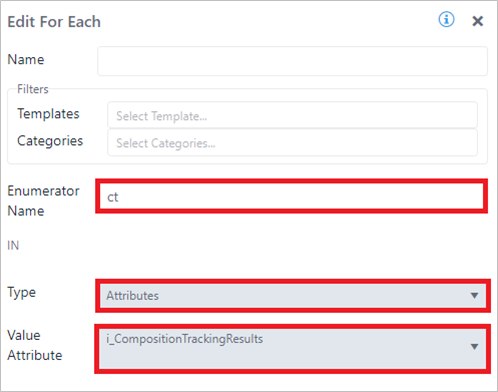
The ForEach code block is configured using Type = Attributes selecting the element's attribute containing the DataTable i_CompositionTrackingResults.
The inner Debug.Print to the ForEach loop is then used to print the
recorded Material, Mass, and Density column values.
{Name} Mat={ct['Material']} Mass={ct['Mass']} Density={ct['Density']}
The special keyword {Name} is used to print the element name from which the table row is coming from.
The ct['Material'], ct['Mass'], and ct['Density'] expressions
allow you to get the column values from the enumerator variable (ct)
configured in the ForEach loop. The column names are enclosed in single
quotes.
Since the Debug.Print is executed for each element in the working space,
it is absolutely worthless to print the same value several times; for
this reason, we enable the below setting of the Debug.Print to print-out
only one instance of the message.
: Set Debug Print to only one instance of the message

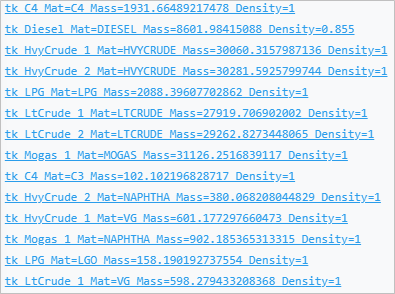
Based on the example, the output that appears in the SFHub Studio window is:
: For Each - Attributes of Type \'Table\' - Debug Print Results
Use the For Each Code Block with Sigmafine Case
The For Each loop enumeration can be configured to iterate on a set of Sigmafine Cases. In this example, the For Each (type Cases) is used to enumerate a group of Sigmafine Case in order to retrieve and print out meters o_rec_Test1 attribute value.
With Sigmafine Cases, For Each enables you to switch the execution context from your current case to the context of all the numerated cases, allowing for the access of element data in multiple cases. The element context is preserved, although the Element refers to the case in the loop.
Example: For Each Enumeration of Sigmafine Cases
| For Each Code Block - Sigmafine Case | Code Transcription |
|---|---|
 | 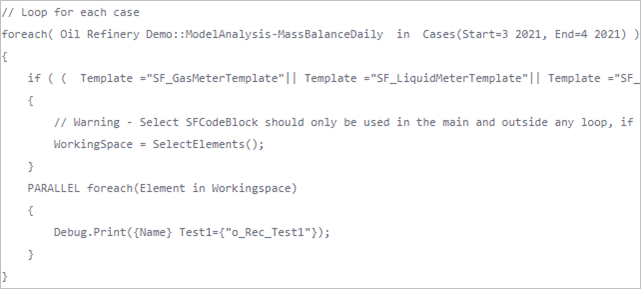 |
Extensive use of For Each over a large set of Sigmafine Cases affects
the performance as well as the resource allocation, due to how the
underlying AF system works. We therefore suggest that to limit its use
by possibly referring to the previous case only, you use the keyword
{PreviousCase}, every time a For Each is required to access to
previous case data.
Use the For Each Code Block with Children Elements
The For Each loop can be configured to navigate through the children elements of parent elements in your Working Space.
For Each of Type Children Elements Example
In the Figure 1 example, the For Each (type Children elements) was used to navigate and print-out the hierarchy path of all the children elements, starting from the root element.
Children Elements Example

Since it not possible to establish, in advance, the depth of the children elements, we use a recursive function to implement the navigation. That function stops as soon as no more children elements are found.
In this following example you can see:
How to create and call a Function, as well as call a function in a recursive way
How to use an element variable, to build the hierarchy path using the keywords:
{TopElement},{PreviousElement}and{Name}How to refer to a different instance of an element variable in order to use its to build the path.
Example: For Each Enumeration of Children Elements
| For Each Code Block - Children Elements | Code Transcription |
|---|---|
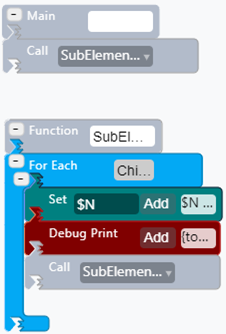 | 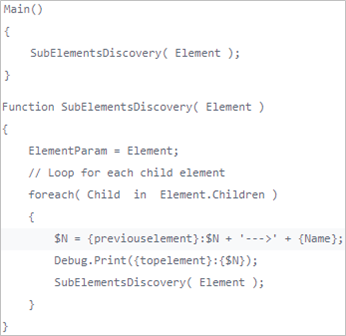 |
The inner code blocks of the For Each are subjected to the element
context switch, from the parent element to the child element. This means
that the keywords {Name} and {PreviousElement} reflect the new
element context.
The results look like this:
