Adjustments Tab
Changes (adjustments) that you make to results appear in the Adjustments tab. Previous and adjusted values for the Element are shown. Comments, if any, time, and the user ID for the person making the adjustment are also shown in the tab.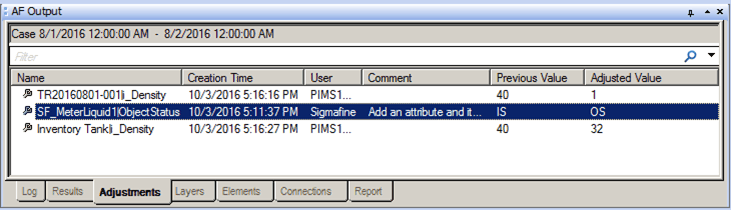
Multiple adjustments to the same Attribute of Element are captured as separate entries in this table only if a 'Check-in’ is performed after creating each adjustments, otherwise only the last adjustment is captured.
The following table provides descriptions for each of the columns found under the Adjustments tab. Please note that all column data is Read Only - the data cannot be edited.
AF Output Window – Adjustments tab
| Column | Description |
|---|---|
| Name | Displays the name of the element. |
| Creation Time | Displays the date and time at which the Element adjustment was made. |
| User | Displays the user name of the person who made the adjustment. |
| Comment | Displays any comment the user may have entered regarding the adjustment. |
| Previous Value | Displays the Element value prior to the adjustment. |
| Adjusted Value | Displays the adjusted Element value. |