Transfer Properties - Attributes Tab
Use the Attributes tab to view Attributes for the transfer.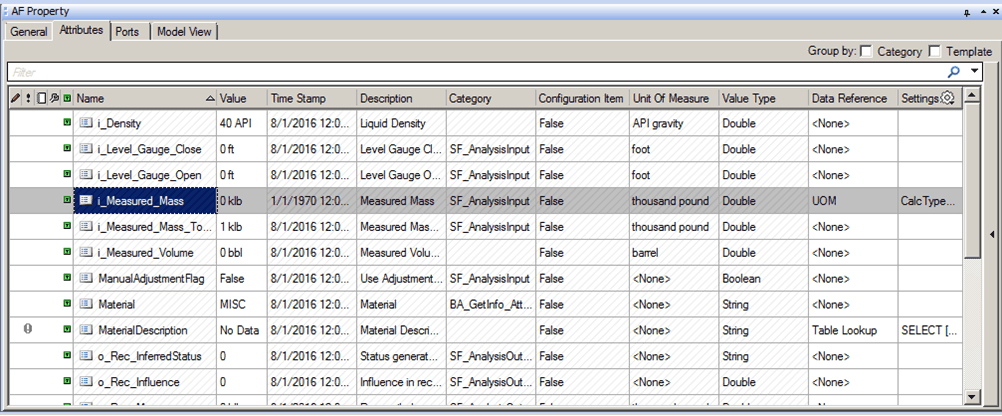
The following table provides descriptions for each of the inputs found under the Attributes tab.
AF Property Window – Attributes Tab for Transfers
| Input Box / Button / Checkbox | Description |
|---|---|
| Group by: Category/Template | (Optional) Check the Category checkbox organize Attributes by grouping them into categories.(Optional) Check the Template checkbox to organize Attributes by template names. |
| Name | Read-only.Displays the name of the attribute. |
| Value | Displays the current value of the attribute. |
| Time Stamp | Read-only.Displays the time stamp of the value. |
| Description | Read only.Displays the description of the Attribute set at the template level. |
| Category | Read-only.Shows the categories by which the Attributes are grouped. |
| Configuration Item | Read-only.If set to True for Attributes when a change in value will result in a revision change to the element.If set to False for Attributes with values that will change with the process.The (configure) icon indicates that the Attribute is a configuration item. |
| Unit of Measure | Read-only.Displays the unit of measure for the attribute. |
| Value Type | Read-only.Displays the data type of the attribute. |
| Data Reference | You can select a data reference for determining the value of the attribute. |
| Settings | If you choose a data reference, click Settings to configure the data reference. |
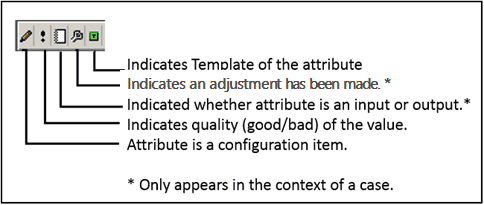
The following diagram provides a description for each of the icons that display in the first column of the Attributes tab table.