Template Properties - Attribute Templates Tab
Use the Attribute Templates tab to configure or change the configurations of the Attributes for the template(s).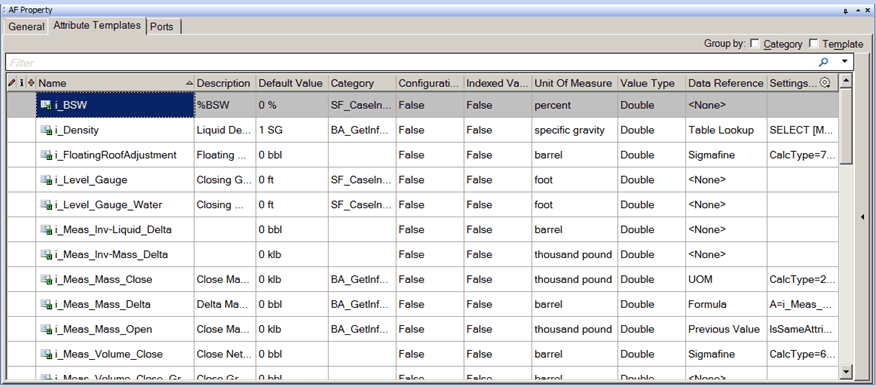
The following table provides descriptions for each of the inputs found under the Attribute Templates tab and what to do with each one.
AF Property Window – Attribute Templates Tab
| Columns | Description |
|---|---|
| Name | Assign a Name to the attribute. |
| Description | (Optional) Enter a Description for the attribute. |
| Default Value1 | Specify a Default Value for the attribute. |
| Group by: Category/Template | (Optional) Check the Category checkbox organize Attributes by grouping them into categories.(Optional) Check the Template checkbox to organize Attributes by template names. |
| Configuration Item | Type True for Attributes when a change in value will result in a revision change to the element.Type False for Attributes with values that will change with the process. The (configure) icon indicates that the Attribute is a configuration item. |
| Indexed Value | When searching for Attribute values, indexed Attributes values are faster to search. Attributes that are not indexed can take a significant amount of time to evaluate, in particular if they are configured with a data reference.Type True to set the Attribute values to be indexed.Type False if you do not want the Attribute values to be indexed.Indexed Attribute templates are marked with the (indexed) icon. |
| Unit of Measure | Select the unit of measure for the attribute. |
| Value Type1 | Select the data type of the attribute. |
| Data Reference | (Optional) Select a data reference for determining the value of the attribute. |
| Settings | If you choose a data reference, click Settings to configure the data reference. |
| 1 If you select 'Anything', the value of the Attribute determines the data type. It becomes selectable on the Attributes Templates tab for the element. Begin by setting the type to a specific type other than 'Anything' so that the default can have a meaningful value that you can edit. Then set it back to 'Anything'. |