Configuring - Net Heating Value Calculation
Use the Net Heating Value Calculation to determine the average net heating value for a mixture of known components.
To configure the Net Heating Value calculation:
Select the analyzer Element and net heating value attribute.
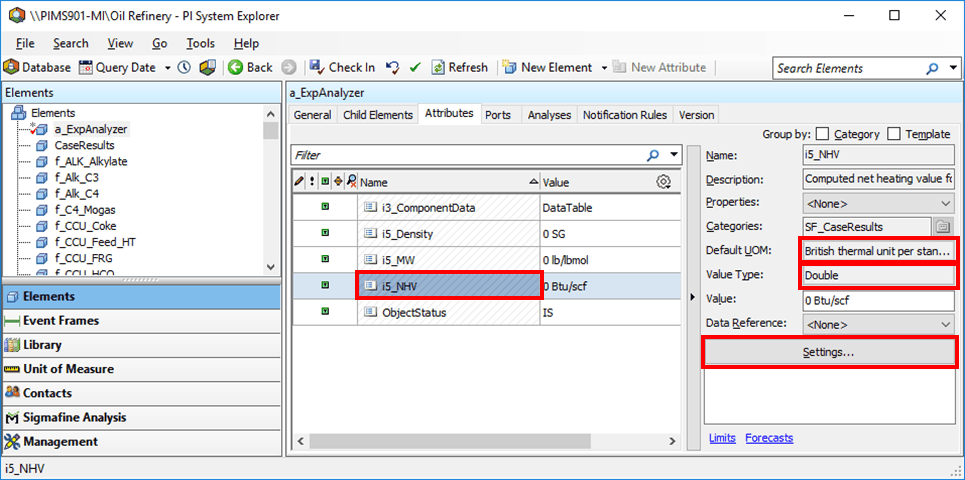
For the attribute’s Data Reference Name, select the Net Heating Value components data reference from which to load the net heating value calculated from the composition, in the selected Component Measurement Data attribute.
The Default UOM value should have a value in the Specific Energy, Volumetric Energy or Volumetric Energy (Standard) class.
The Value Type should be Double.
Click the Settings button.
The Components Data Reference window opens.

Under Calculation type, select Physical Property Calculations, then click Next.
The Physical Property Calculation window opens.
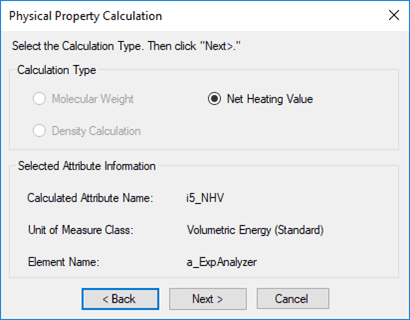
Select Net Heating Value (this is the only option available since the UOM for the Attribute is in the density class) and click Next.
The Density Calculation window opens.
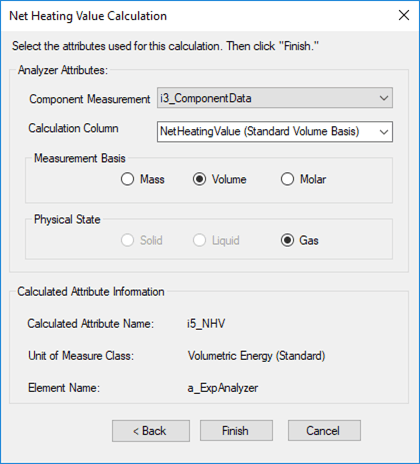
Fill in the Physical Property Calculation window as described in the table below.
Attribute Description Component Measurement Data The Attribute where the component analysis data is entered. Measurement Basis Select the type of analysis entered in the component measurement data attribute. Physical State Determines the calculation to be used. Solid Not applicable. Liquid Not applicable. Gas Gases, Liquids or Solids from Mass FractionsGases from Molar FractionsGases from Liquid Fractions Note: Configure the component measurement data Attribute before configuring the Net Heating Value Calculation, (see Configuring - Analyzer Configuration).
When done with your configuration settings, click Finish.