Configuring - Measurement Basis Conversion
Use the Measurement Basis Conversion to change the basis of measurement of an analyzer between the following in either fractions or percent:
- Molar basis
- Mass basis
- Volume basis
To configure the Measurement Basis Conversion calculation with the wizard, select the Components Data Reference (see Configuring the Components Data Reference), and follow the steps below.
Select the analyzer Element and the component data Attribute to load the compositions.
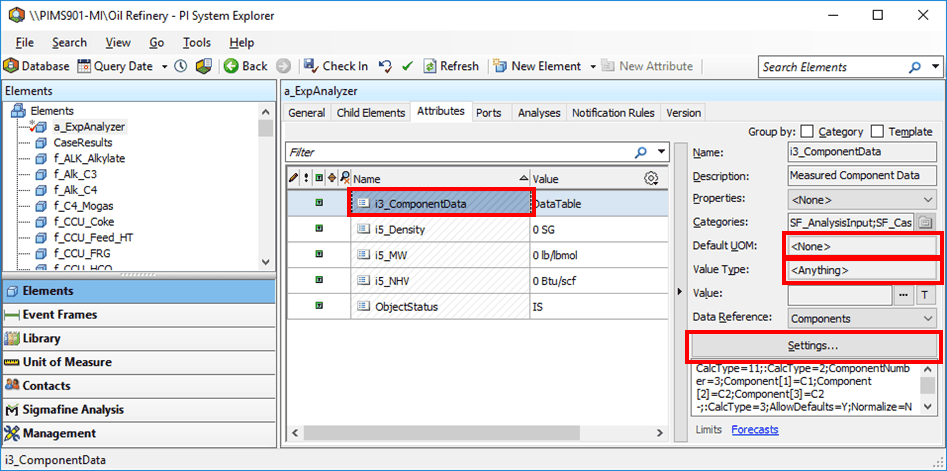
For the attribute’s Data Reference Name, select ComponentData (where to load the new composition values.).
The Default UOM value should be None.
The Value Type should be Anything.
Click the Settings button.
The Components Data Reference window opens.
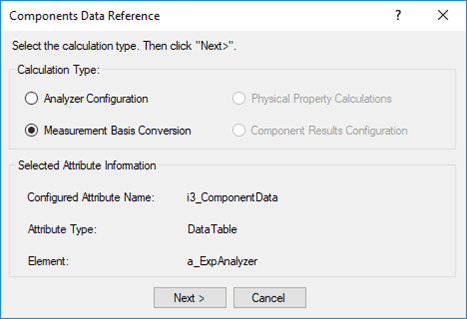
Under Calculation type, select Measurement Basis Conversion, then click Next.
The Measurement Basis Conversion window opens.
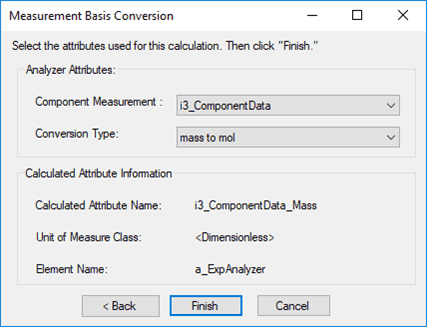
Fill in the window as described in the table below.
Measurement Basis Conversion window
Input Box / Button Description Component Measurement Select ComponentData attribute. Conversion Type Select the type of component conversion. For example, if the Calculated Attribute is specified as mass fractions and the Measurement Attribute is specified as molar fractions must have values of molar fraction, select the mole to mass option. Note: Configure the component measurement data Attribute before configuring the Measurement Basis Conversion calculation (see Configuring - Analyzer Configuration).
When done with your configuration settings, click Finish.