Template Properties - Ports Tab
Use the Ports tab to specify how to connect elements created from this template. Elements are connected through their ports.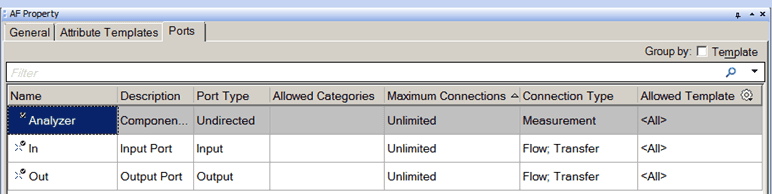
The following table provides descriptions for each of the inputs found under the Ports tab and what to do with each one.
AF Property Window – Ports Tab for Templates
| Input Box / Button / Checkbox | Description |
|---|---|
| Group by: Template | (Optional) Check the Template checkbox to organize ports by template names. |
| Name | Type a Name for the port. |
| Description | (Optional) Enter a Description for the port. |
| Port Type | Select the Port Type: Input, Output, or Undirected (for meters, for example). |
| Allowed Categories | Select the categories to which the port is allowed to be a member. |
| Maximum Connections | Specify the maximum number of connections that can be made to the port.Enter Unlimited for an unlimited number of connections. |
| Connection Type | Select the Element types to which the port can be connected; node, measurement, flow, transfer, boundary, and other. |
| Default Port | Select whether this is the default port. Each port type can have one default port for each port type. That is, if five inputs and two outputs are defined, one input port can be a default, and one output port can be a default. |
| Allowed Template | Select elements allowed to connect to the port. Select only elements created from the selected template. |