Using the AF Property Window for Layers
Layers in the Model can be accessed using the AF Browser window, under the Model element.
- Right-clicking on Layers shows the following options
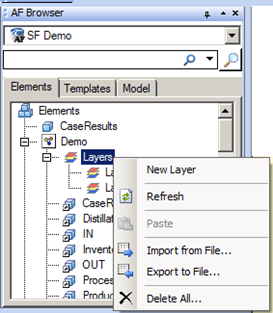
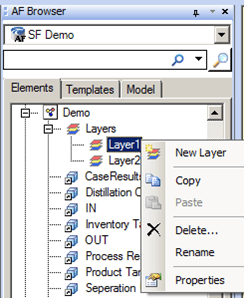
- Right-clicking on an existing Layer under the Layers tree shows the following options
AF Browser Window – Options for Layers
| Option | Description |
|---|---|
| New Layer | Allows you to create a new Layer. |
| Refresh | Allows you to refresh the layer information. |
| Paste | Allows you to create a new Layer with the one that was copied using the same properties. |
| Import from File | Allows you to import layers using an XML file. |
| Export to File | Allows you to export layers to an XML file. |
| Delete All | Allows you to delete all layers under the selected Layers tree. |
AF Browser Window – Options for a Specific Layer
| Option | Description |
|---|---|
| New Layer | Allows you to create a new Layer. |
| Copy | Allows you to copy the selected layer. |
| Paste | Allows you to create a new Layer with the one that was copied using the same properties. |
| Delete | Allows you to delete the selected layer. |
| Rename | Allows you to rename the selected layer. |
| Properties | Opens the Layer Properties window which contains all the elements in the Model and allows you to select and deselect elements from the selected layer. |
The Layer Properties open in the AF Property window. See Layer Properties - General Tab for details about the Layer Properties options.