Create the IMM Website
After an IMM Application Pool is setup and modified, the next step in the process is to create the IMM Website. This is done by adding the new website in the IIS Manager. Note that the same process can be used to view or modify an existing IMM website.
To create the new IMM Website:
Open the IIS Manager window, if not already open.
Open the Windows Control Panel.
Go to Administrative Tools > IIS Manager.
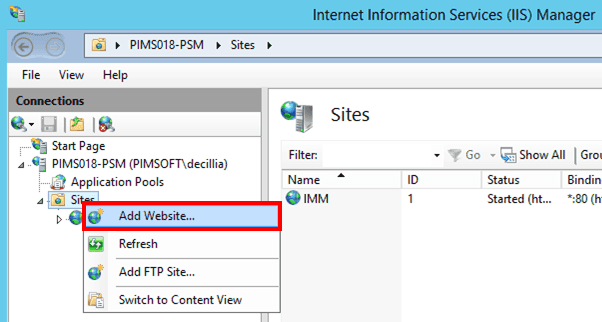
In the 'Connections' pane, right-click on Sites and select Add Website, as shown in the Figure 1567.
The Edit Site window opens.

In the Physical path box, type the path to the subdirectory/folder to which you copied the files from the "ws" subdirectory/folder.
This is the same subdirectory/folder you entered in step 3 under Install the IMM Web Service.
Click OK to save the path and close the window.
 To open Windows IIS Manager
The next step is to ensure that the appropriate parameters are set up for the IMM Website you just created. This is done by viewing the IMM Website parameters in the Advanced Settings window for the IMM site.