Install the IMM Web Service
Sigmafine IMM Web service installation can be installed manually without using the setup kit following the procedure below:
Log onto the designated server with an administrative account and close all running applications.
Go to the ws subdirectory/folder of the IMM installation package.
Copy the files from the ws subdirectory/folder to the website directory/folder.
(i.e., C:\inetpub\wwwroot\ws)
Copy the license file to the following directories/folders:
- C:\Windows\System32\
- C:\Windows\SysWOW64\
- Create a local domain Windows User Account with the following settings:
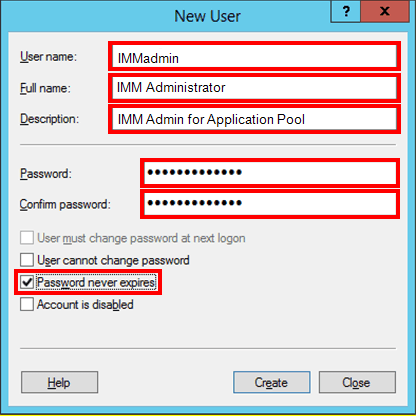
- In the Name box, type an abbreviated name. This can be any name of your choosing.
- In the Full name box, type the longer version of the name you abbreviated in step 'a'.
- In the Description box, type a short description of the account.
- In the Password box, type a log in password for the account.
- In the Confirm password box, retype the same log in password.
- Check the Password expiration to ensure that they password never expires (is never forced to be changed).
- Click the Create button to save your settings and create the account.
- On the General tab, add this user account to the Administrators group so it has read/write permissions over the AF system.
- Click OK to save your settings and close the window.