Create an IMM Application Pool
The first step in setting up IMM is to create an IMM Application Pool in Windows Internet Information Services (IIS) Manager.
To setup the IMM application pool:
Open the Windows Control Panel.
Go to Administrative Tools > IIS Manager.
The IIS Manager window opens.
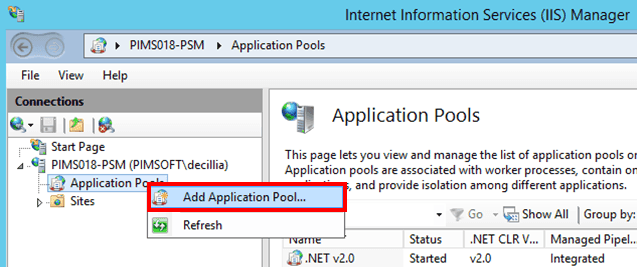
In the 'Connections' pane, right-click on Application Pools and select Add Application Pool, as shown in Figure 1564.
The Edit Application Pool window opens.

In the Name box type IMM.
Click on the .NET CLR version down-arrow and select .NET CLR Version 4.0.30319 (or .NET Version 4.030319).
Check the Start application pool immediately checkbox.
Click OK to save your selections and close the window.
The next step is to modify the parameters for the IMM Application Pool you just created.