IMM_TankInvConf Table
The AF Table called IMM_TankInvConf contains the settings used to implement the Tank Calculation. It contains all of the information for the tank calculation table accessible from the IMM Transfer edit window.
 EXAMPLE: IMM_TankInvConf table structure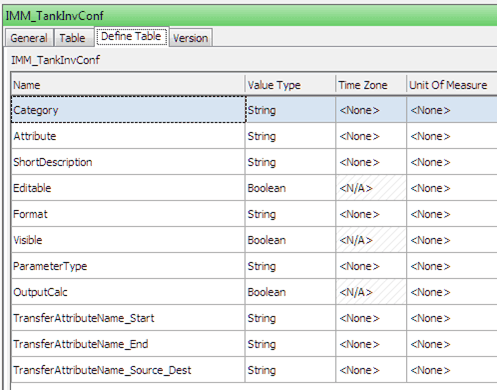
In the 'IMM_TankInvConf' table, every row has the Attribute name that is an Attribute of the associated category, and a short description. Every Attribute has two flags; one that determines whether the Attribute is editable and another that determines whether it is visible. In addition, each Attribute has a string that defines the cell setting. The Attribute that represents the quantity of the movement should have 'OutputMass' set to "true".
The following table lists the Attributes in the IMM_TankInvConf table with explanations and settings.
IMM_TankIvnConf Attributes
| Attribute Name | Description | Setting |
|---|---|---|
| Category | AF Category Name: the category of the Element of the attribute (i.e. SF_TANK) | String that matches with the name of AF Category name |
| Attribute | The AF name of the Element Attribute to calculate | String that matches with one of the names of the Attributes of the AF Template |
| Short Description | Visible description of the attribute | Free string |
| Editable | True if the user can edit the value of the attribute | True / False |
| Format | Decimal number format | Examples: 0.00, #.##0, 0 |
| Visible | Flag that sets the row’s visibility | True / False |
| ParameterType | Input, if the Attribute is used in the calculation, output otherwise. | Input / Output |
| OutputCalc | Flag that says if the output Attribute is the quantity of transfer. | 'True' is possible only for a single output row and identifies the quantity value that is read from Get Value by Source function or from Get Value by Destination in the 'Quantity' tab of a new Transfer definition. |
| TransferAttributeName_Start* | Name of the start time Attribute on the transfer template for saving the calculated value | Example: StartingGauge |
| TransferAttributeName_End | Name of the end time Attribute on the transfer template for saving the calculated value | Example: EndingGauge |
| TransferAttributeName_Source_Dest | Put OriginDestination for the Attribute that could be saved | OriginDestination/ “” (empty) if it is not interested in the “recovery” functionality |
Note: Any changes to a command requires a reset before the changes can take place. IISRESET must be run on the server from a DOS prompt to perform the reset.
EXAMPLE: IMM_TankInvConf table attributes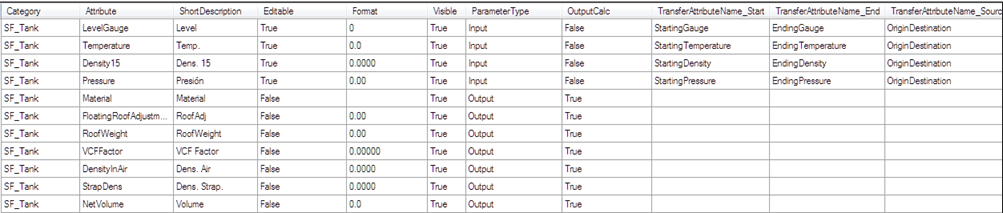
During the installation, the 'Transfer Template' must be customized to contain all of the Attributes specified in TransferAttributeName_Start and TransferAttributeName_End that you want to be able to save.