IMM_Params Table
The IMM_Params AF table contains all of the parameters used by the Pimsoft software, and it is useful for the right configurations to be in place when the program is installed.
 EXAMPLE: IMM_Params table structure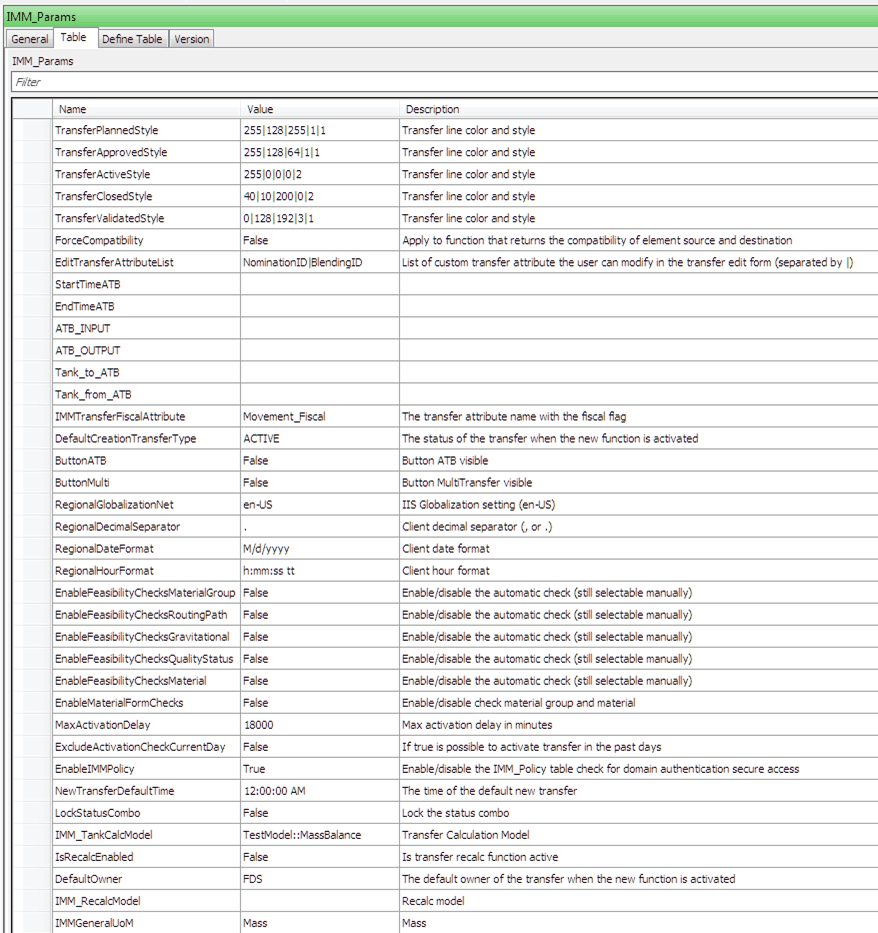
The structure of the 'IMM_Params' table is as follows:
IMM_Params Table Structure
| Column Heading Name | Description |
|---|---|
| Name | The name of the parameter. |
| Value | The value of the parameter. |
| Description | The parameter's description. |
The standard parameters that allow you to choose which features to enable or disable are explained in the following table:
IMM_Params Standard Parameters
| Parameter Name | Description |
|---|---|
| ATB_INPUT | |
| ATB_OUTPUT | |
| ButtonATB | Indicates whether the Button ATB is visible. |
| ButtonMulti | Indicates whether the ButtonMultiTransfer (Bulk Load) is visible. True = visible, False = not visible |
| DefaultCreationTransferType | The status of the transfer when the new function is activated. |
| DefaultOwner | The default owner of the transfer when the new functions is activated. |
| EditTransferAttributeList | A list of custom transfer Attributes you can modify in the transfer edit window (separate Attributes by an ‘|’). |
| EnableFeasibilityChecksGravitational | Enable/disable the automatic check (still selectable manually) |
| EnableFeasibilityChecksMaterial | Enable/disable the automatic check (still selectable manually) |
| EnableFeasibilityChecksMaterialGroup | Enable/disable the automatic check (still selectable manually) |
| EnableFeasibilityChecksQualityStatus | Enable/disable the automatic check (still selectable manually) |
| EnableFeasibilityChecksRoutingPath | Enable/disable the automatic check (still selectable manually) |
| EnableIMMPolicy | Enable/disable the 'IMM_Policy' table to check for domain authentication secure access. |
| EnableMaterialFormChecks | Enable/disable the checking of the material group and material during the transfer standard check. |
| EndTimeATB | |
| ExcludeActivationCheckCurrentDay | If set to "true", it allows the transfer to be activated in the past days. |
| ForceCompatibility | Applies to function that returns the compatibility of the Element source and destination. |
| IMM_RecalcModel | Represents the Recalculation Model. |
| IMM_TankCalcModel | Represents the Transfer Calculation Model. |
| IMMGeneralUoM | Equivalent to 'Mass'. |
| IMMTransferFiscalAttribute | Represents the transfer Attribute name with the fiscal flag. |
| IsRecalcEnabled | Indicates whether the transfer recalc function is active. |
| LockStatusCombo | Lock the status the combination box (list of available statuses). |
| MaxActivationDelay | Max activation delay in minutes |
| NewTransferDefaultTime | The time of the default new transfer |
| RegionalDateFormat | Client date format |
| RegionalDecimalSeparator | Client decimal separator (, or .) |
| RegionalGlobalizationNet | IIS Globalization setting (en-US) |
| RegionalHourFormat | The hour format on the Client. |
| StartTimeATB | |
| StartTimeATB | |
| Tank_to_ATB | |
| TransferActiveStyle | The Transfer line color and style. |
| TransferApprovedStyle | The Transfer line color and style. |
| TransferClosedStyle | The Transfer line color and style. |
| TransferPlannedStyle | The Transfer line color and style. |
| TransferValidatedStyle | The Transfer line color and style. |
| EnableTransferListGrouping | Enable/disable the grouping virtual folder (see AttributeTransferListGrouping and AttributeBlendingListGrouping) |
| AttributeBlendingListGrouping | The Transfer Attribute to be used for the blending grouping aggregation in the Transfer List Table (i.e. BlendingID). |
| AttributeTransferListGrouping | The Transfer Attribute to be used for the grouping aggregation in the Transfer List Table (i.e. NominationID). |
| AllowClosedTransferEditing | If set to 'True', it bypasses the work flow check on movement with a CLOSED status. With this setting, you are allowed to change any property. |
Note: Any changes to a command requires a reset before the changes can take place. IISRESET must be run on the server from a DOS prompt to perform the reset.