Referenced UOMs and IMM_BulkMovements Table
The Transfer Bulk Load feature works using the UOMs defined in the 'IMM_BulkMovements' table.
IMPORTANT: The 'IMM_BulkMovements' table MUST be installed and properly configured.
The IMM administrator can change the Unit Of Measure in order to customize the data-entry, as long as they respect the following assumptions:
- Mass UOM shall belong to ‘Mass’ UOM Class.
- Volume UOM shall belong to ‘Volume’ UOM Class.
- Rate UOM shall belong to ‘Volume Flow Rate’ or’ Mass Flow Rate’ UOM Classes.
- Density UOM shall belong to ‘Density’ or ‘Specific Gravity’ UOM Classes.
 EXAMPLE: IMM_BulkMovements table with data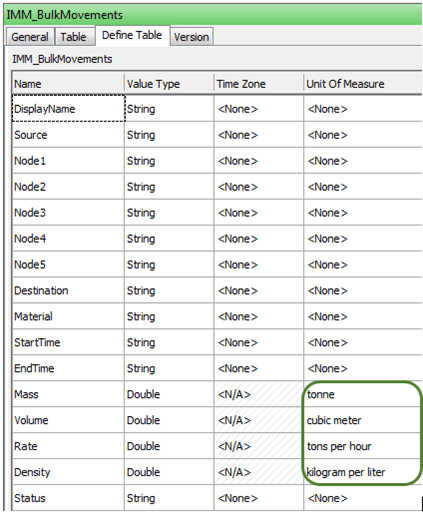
Note: It is not mandatory to have the IMM_BulkMovements table filled with data, unless it is required to enable the Bulk Load.