Transfer Bulk Load
The Transfer Bulk Load feature allows you to create multiple transfers using an easy, Excel like, interface in a Create Multiple Movements window.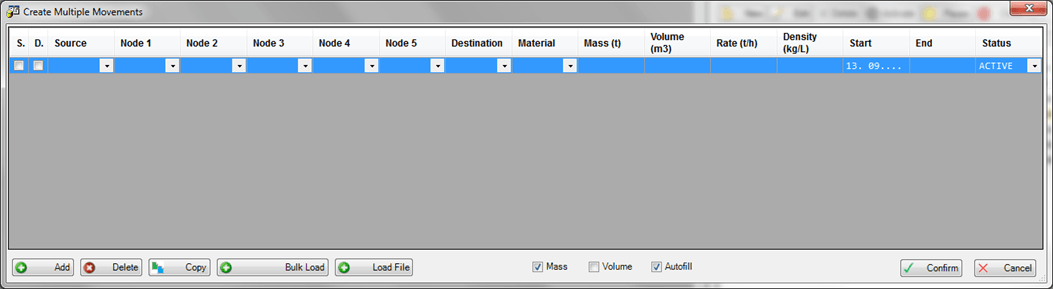
In the Create Multiple Movements window, you can create new transfers using a smart data entry where any required information can be easily declared in the following columns.
- Source
- Intermediate Node 1
- Intermediate Node 2
- Intermediate Node 3
- Intermediate Node 4
- Intermediate Node 5
- Destination
- Material Code
- Mass
- Volume
- Flow Rate
- Density
- Start Time
- End Time
- Status
You are fully supported to estimate the transfer quantity based on the available information (e.g. the mass can be calculated based on the volume and density or the flow rate). In addition, you can import predefined transfers from the 'IMM_BulkMovements' table or from a .csv file.
At the bottom of the window, there are a series of buttons and checkboxes, which are described in the following tables.
Buttons
| Button | Description |
|---|---|
| Add | Click this button to add a new, empty row in the list. |
| Delete | Click this button to remove a selected transfer from the list. |
| Copy | Click this button to create a copy of the selected transfer row. This feature allows you to easily create a copy of an already declared transfer and change its data as needed. |
| Bulk Load | Click this button to load the set of predefined transfers from the 'IMM_BulkMovements' table. |
| Load File | Click this button to load the set of predefined transfer from the selected .csv file. |
| Confirm | Click this button to confirm the create of the transfers in the list. |
| Cancel | Click this button to exit the window without creating the transfers. |
Checkboxes
| Checkbox | Description |
|---|---|
| Mass | Check this checkbox to indicate that the quantity of the transfer is by Mass.Any change on the density triggers the recalculation of the volume and flow rate. Flow Rate is updated only if its unit of measure is volume-based (e.g. m3/h). |
| Volume | Check this checkbox to indicate that the quantity of the transfer is by Volume.Any change on the density triggers the recalculation of the mass and flow rate. Flow Rate is updated only if its unit of measure is a mass-based (e.g. t/h). |
| Autofill | Check this checkbox to indicate that the data-entry and the bulk load are assisted by automatic calculations according to the following table.When not checked, it indicates that the free data-entry is enabled without any check on the consistency of the entered values. |
'Autofill' - Automatic Calculations
| Changed Value | 'Mass' checkbox is checked | 'Volume' checkbox is checked |
|---|---|---|
| Mass | Volume is recalculated based on the new Mass and the current Density.Rate is recalculated based on the new Volume or the new Mass depending on the UOM class of the Rate (Volume/Mass Flow Rate). | |
| Volume | Mass is recalculated based on the new Volume and the current Density.Rate is recalculated based on the new Volume or the new Mass depending on the UOM class of the Rate (Volume/Mass Flow Rate). | |
| Rate | If the Rate UOM class is volume flow rate:Volume is recalculated based on the new Rate and the current transfer duration.Mass is recalculated based on the new Volume and the current Density.If the Rate UOM class is volume mass rate:Mass is recalculated based on the new Rate and the transfer duration.Volume is recalculated based on the new Mass and the current density. | |
| Density | Mass remains unchanged.Volume is recalculated based on the new Density and the current Mass.Rate is recalculated based on the new Volume and the current transfer duration only if the UOM class of the Rate is Volume Flow Rate.Rate remains unchanged only if the UOM class of the Rate is Mass Flow Rate. | Volume remains unchanged.Mass is recalculated based on the new Density.Rate is recalculated based on the new Mass only if the UOM class of the Rate is Mass Flow Rate.Rate remains unchanged only if the UOM class of the Rate is Volume Flow Rate. |
| Start or End | Mass remains unchanged.Volume remains unchanged.If the Rate UOM class is Volume Flow Rate:Rate is recalculated based on the new transfer duration and the current Volume.If the Rate UOM class is Mass Flow Rate:Rate is recalculated based on the new transfer duration and the current Mass. |