Recalculation Action
The Recalculation Action executes the recalculation of cases.
To recalculate cases:
In the Transfer dockable window, select the transfer you want to edit.
On the Transfer dockable window toolbar, click on the Recalc button.
The 'Transfer Calculation' Plug-In Recalculation window opens.
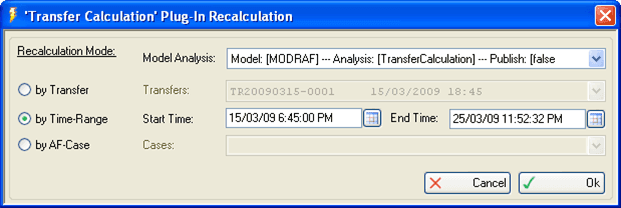
From this window you can re-run analysis plug-ins (Transfer Calculation or Tank Qualities) over a specific range using a both a start and end value.
Click on the Model Analysis down-arrow and select the analysis you want to re-run.
Select the Recalculation Mode option that corresponds to the start and end values.
- by Transfer: The recalculation period is set using the start time and end time of the transfer a selected transfer.
- by Time-Range: The recalculation period is set manually using the a selected start and end time.
- by AF-Case: The recalculation period is set by using the period that coincides with a selected AF case.
Depending on which 'Recalculation Mode' you selected, follow the appropriate steps below.
If you selected by Transfer:
Click on the Transfers down-arrow and select the transfer to be used.
If you selected by Time-Range:
In the Start Time box, type the start date and time in
mm/dd/yyyy 00:00:00 AM (or PM)format.OR
Click the Calendar button to select the date and time from the Calendar window.
In the End Time box, type the end date and time in
mm/dd/yyyy 00:00:00 AM (or PM)format.OR
Click the Calendar button to select the date and time from the Calendar window.
If you selected by AF-Case:
- Click on the Cases down-arrow and select the AF Case to be used.
- Click OK to save your selections, close the window and initiate the recalculation.