Transfer Properties - General Tab
Use the General tab to configure the basic settings for an element.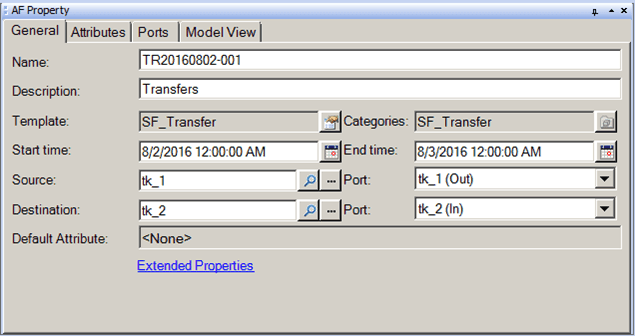
The following table provides descriptions for each of the inputs found under the General tab and what to do with each one.
AF Property Window – General Tab for a Transfer
| Input Box / Button / Checkbox | Description |
|---|---|
| Name | Assign a Name for the transfer. |
| Description | (Optional) Enter a Description for the transfer. |
| Template | Read-only.Shows the template on which the transfer is based.Click the Transfer Template icon to open the Element Template Properties window. |
| Categories | Read-only.Displays the transfer categories defined by the template. |
| Start Time | Start time for when the transfer takes place.Type the date or click the Calendar button to browse for a date. |
| End Time | End time for when the transfer takes place.Type the date or click the Calendar button to browse for a date. |
| Source / Port | Type or select the Element and port providing the material of the transfer. |
| Destination / Port | Type or select the Element and port receiving the transfer. |
| Default Attribute | Read-only.The Attribute that is most representative of the transfer. |