Get Names of Elements
The Elements option retrieves the names of elements, based on the selected Element category of a Model and Element name mask.
To get a list of elements:
In Excel, select the cell into which you want the information to be brought.
From the SF tab Find Data section, select Elements.

The Element Search window opens.
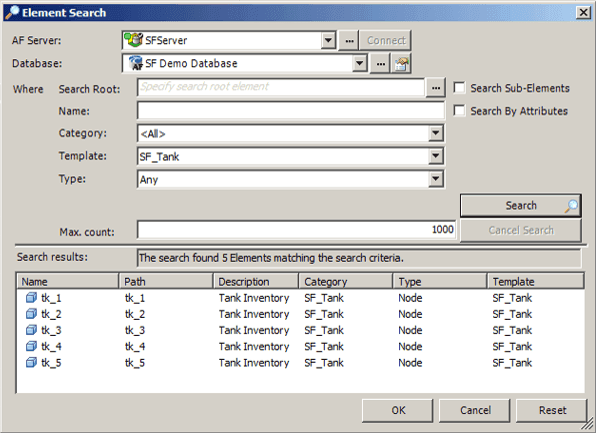
Click the AF Server down-arrow and select the system where the Sigmafine Server is running.
Click the Database down-arrow and select the database.
This selection is dependent on th Sigmafine Server selection.
In the Name box, type the name of the element, or part of the name with the wildcard *.
Click the Category down-arrow and select an Element category.
This selection is dependent on the Database selection.
Click the Template down-arrow and select an Element template.
This selection is dependent on the Database selection.
Click the Type down-arrow and select an Element type.
(Optional) To include the sub-elements that meet the search criteria in the results, check the Search Sub-Elements checkbox.
(Optional) To include options that allow you to search for elements using queries for Attributes and their values, check the Search By Attributes checkbox.
The following additional search options appear that allow you to configure one or more Attribute queries.

In the Max count box, type a number to limit the number of elements returned in the list.
Click the Search button to retrieve the elements that meet the search criteria.
The Search Results box displays the number of elements that meet the search criteria. It also shows a message if the process encounters an error.
Elements meeting the criteria appear in the blank space at the bottom of the window.
Click OK to add the returned information to the spreadsheet.
Should you want to perform another 'Element' search without first adding the current results to the spreadsheet, click the Reset button. This action clears the entry boxes of the previous Element search parameters.
Should you not want to add the information to the spreadsheet and instead just exit the Element Search window, click Cancel.