Required Standard Import File Formats
The correct file format will ensure that your data gets imported. The Worksheet must have both a Select(x) and Name column, in that order, followed by the other Attributes in the remaining columns. Headers for the remaining columns must be the names of Attributes that exist for the Elements.
Please refer to the appropriate \topicfor details regarding additional file formatting requirements of the type of data you are importing.
Standard Required Spreadsheet Columns
| Column | Description |
|---|---|
| Select(x) | If the row contains an "x". the row of information will be imported to Sigmafine. |
| Name | Refers to the given name for the Element. |
| Attribute | Refers to the name of the Attribute to be imported to Sigmafine. |
Note: While working with Excel Files, it is common to have several Workbooks open at the same time. We recommended that you close all Excel Files and keep them closed, while working with Data Importer. Double-clicking on another Excel file while running the Data Importer will cause a message to appear stating that you need to close the current workbook.
IMPORTANT: It is necessary to make sure that the right Worksheet is active when importing. Before you import, view the Excel file (double-click on the selected Excel file in the Data Importer window) and ensure that the worksheet that is open is the one you want to import from.
Standard Data Table File Format
The format of the Excel spreadsheet shall be according the table format to be loaded.
Excel templates are available under the 'Data Importer' installation directory where each spreadsheet has the scope to provide the expected format for each Sigmafine supported data table:
- Composition Tracking Results
- Genealogy Tracking Results
- Quality Tracking Results
- Any table – Example (example of possible custom table)
Excel templates are available in two files:
- Data Importer Template.xlsx
- Data Importer Template (Multicase).xlsx
Each template has the following format: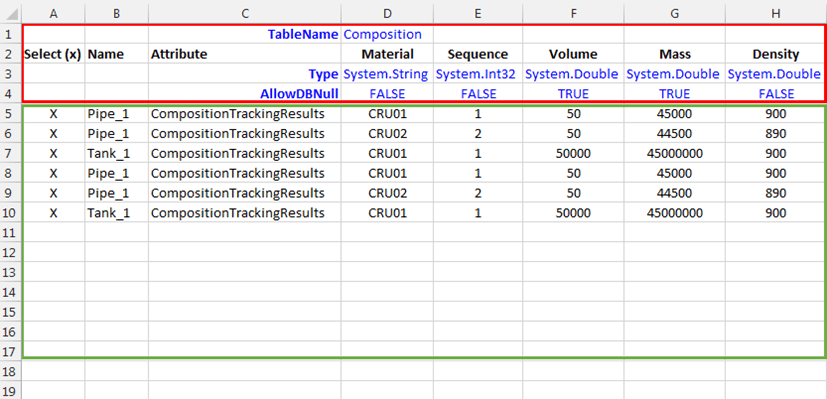
- The section enclosed in the red square is the header of the template. This section contains all the settings used by the Data Importer to create the data table in the right format as expected by Sigmafine.
- The section enclosed in the green square holds the data to be loaded in the data table.
Cell Ranges and Descriptions for building the Data Table
| Cell Range | Description |
|---|---|
| Row 1 Column D | The name that will be assigned to the table. |
| Row 2 Columns A + C | The fixed part. |
| Row 2 Columns D + H | The column names of the data table. |
| Row 3 Columns D + H | The column types of the data table. |
| Row 4 Columns D + H | AllowDBNull setting for each column:If TRUE and the corresponding data cell is empty, then a "null" value is loaded.If FALSE and the corresponding data cell is empty, then a default value is loaded according to the type of data, as shown in the following table: Default TypeDefault ValueSystem.BooleanFALSESystem.Int16/UInt61System.Int32/UInt32System.Int64/Uint640System.DoubleSystem.SingleSystem.Decimal0.0System.StringAn Invalid column value exception error is raised. |
| Default Type | Default Value |
| System.Boolean | FALSE |
| System.Int16/UInt61System.Int32/UInt32System.Int64/Uint64 | 0 |
| System.DoubleSystem.SingleSystem.Decimal | 0.0 |
| System.String | An Invalid column value exception error is raised. |