Adjustments for Transfers
The configuration options you select for 'Adjustments' and 'Load Transfers into' determine what happens with the transfer data adjustments. The following various configurations provide what your result will be, based on your option selections.
Configuration 1: 'Adjustment' checked - 'Load Transfers into' unchecked
With the above configuration, Transfers get created in the database.
The transfers can be found in System Explorer by click Event Frames in the navigation pane and then looking under the 'Transfer Tables' tree.
 EXAMPLE: Transfer Tables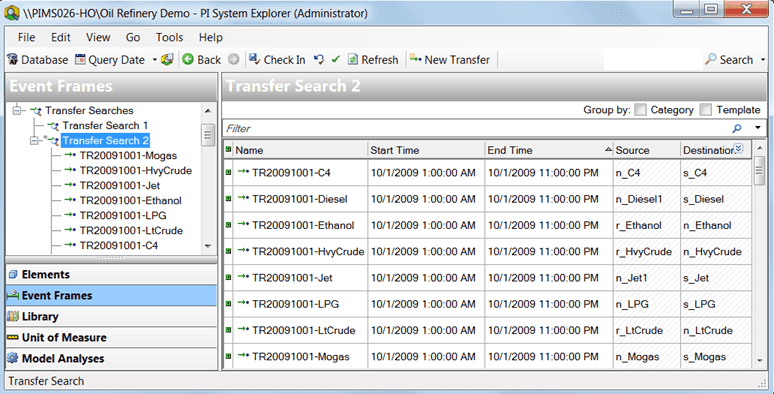
Configuration 2: 'Adjustment' checked - 'Load Transfers into' checked - Single Case
With the above configuration, Transfers are created in the database and then automatically get pushed into the case, providing the transfers in the spreadsheet belong to the same Case as you have selected in your Case option in the Data Importer configuration window. With Adjustment checked, the adjustment is made to the existing transfer.
The transfers can be found in System Explorer by click Event Frames in the navigation pane and then looking under the Transfer Tables tree and also in the relevant case.
Configuration 3: 'Adjustment' unchecked - 'Load Transfers into' checked - Single Case
With the above configuration, if the Transfer exists in the database but Adjustment is not checked, the Transfer is not created and the adjustment is not made.
Configuration 4: 'Adjustment' checked - 'Load Transfers into' checked - Multiple Cases
With the above configuration, if the Transfers exist in the database, with Adjustment checked, the adjustments are made to the existing transfers for the multiple cases.
Configuration 5: 'Adjustment' unchecked - 'Load Transfers into' checked - Multiple Cases
With the above configuration, if the Transfers exist in the database but Adjustment is not checked, the Transfers are not created and the adjustments are not made.