Custom Unit of Measure for Attribute Values
In some situations, the Units of Measure that need to be imported to Sigmafine are not the ones being used by the attribute.
For example, let’s suppose you need to import the following data to Sigmafine for tanks T-10085 and T-10086:
You are importing 158.99 liters to tank T-10085 and 317.98 liters to tank T-10086. Attribute i_TankCapacity’s UOM is in barrels (bbl.). Therefore, you need to do the following in the import file prior to doing the import:
- Add a column called
UOM_\<attribute\>immediately to the right of the Attribute in question. In this Case you would add the columni_TankCapacity. - Ensure that the General Adjustment Comments (
ADJUSTMENTCOMMENT_GENERAL) is the very last column. - Add the incoming Units of Measure for the data to be imported: liters for value 158.99 (for T-10085) and liters for 317.98 (for T-10086).
- Perform the import (click the Import Data button).
The log generated for the above example would be as follows: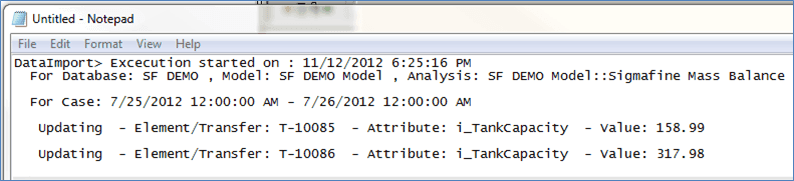
To see the results of the conversion from liters to barrels:
Open System Explorer.
Right-click on the 'Value' for T-10085.
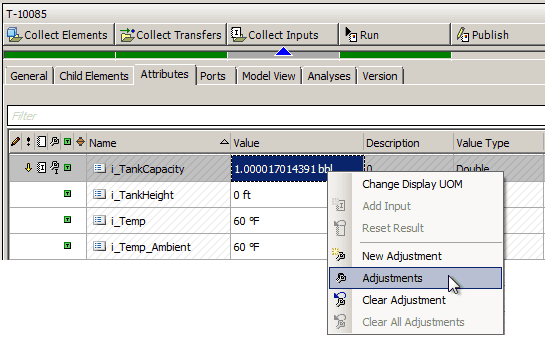
Select Adjustments.
The Adjustments for T-10085 are displayed under a column named 'Adjusted Value'.

The new adjusted value is almost 1 barrel, as 158.99 liters are almost 1 barrel. Also, the comment is recorded as expected.
Import Issue
If you attempted to import information from one class to another (Volume versus Mass) the Data Importer will not perform the updating operation. For example, if you attempt to import 158.99 'pounds' and this unit needs to be converted to 'barrels', The Data Importer will not perform the updating operation, because the Unit of Measure, pound, belongs to a different class. 'Barrels' (bbl.) is used for the Volume class while 'Pound' (lb.) is used for the Mass class.
 EXAMPLE: Different Class UOM's Import attempt
The log results would look like this: