Object Status Setting
By default, the Object Status Attribute is automatically selected to be displayed wherever the Object Status appears in a panel. However, if you would prefer to have the status of another Attribute displayed in its place, you can select an alternate Attribute in under your user Settings.
This setting is reflected in the SFHub Visualizer Display when you rest your mouse pointer over an Element. It is also reflected in the SFHub Visualizer Element Detail panel under the Quick Edits section.
To set or change the Object Status setting:
Ensure that you have clicked on a Template for which to define the Quick Summary layout.
Object Status panel setting
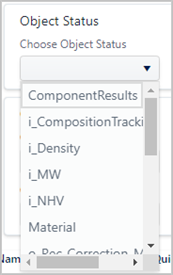
In the Object Status panel, click the Choose Object Status down-arrow to expand a list of Attributes.
Click on the Attribute you want.
When finished, you can either define another layout in the Display Setting or click on the Template's "-" collapse icon to collapse the template's settings view.
Your configurations are automatically saved as soon as you make a change.