Manage System Information
The System Info page shows statistical data about the active connections of each browser session connected to the SigmafineHub Application Server. It also allows you to tune SFHub communication settings. The page is structured by collapsible panels that you can open as needed. Several of these panels support some sorting and grouping features, as shown in the following figure.
System Info sub-panels - sorting and grouping features
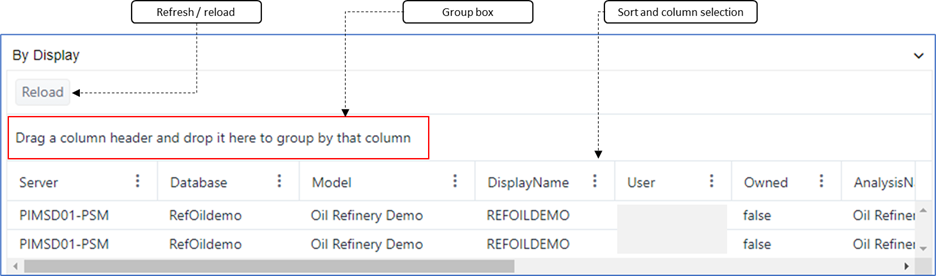
| Feature | Description |
|---|---|
| Reload button | The 'Reload' button is used to refresh the data in the panel. To refresh the data list in the panel, click the Reload button. |
| Group box | The 'Group' box allows you to group the data in the list by specific columns of data. For more information on using this feature, see Group and Sort Lists. |
| Sort and Column selection | The 'Sort' feature allows you to sort the data list in ascending or descending order, or by the order in which the data row was added to the system. For more information on using this feature, see Group and Sort Lists. The 'Column' selection feature allows you to select the columns you want to view in the data list. For more information on using this feature, see Select Columns to Display. |
The following system information panels are available from the System info page: