Case Rurren Properties
The Workflows Properties settings in SFHub Visualizer and the Case Runner Properties settings in SFHub Admin, allow you to select preferences for running the Workflow (Case Runner) analysis steps.
To select options for running Workflow (Case Runner) steps:
Scroll down the Workflows Properties section under Settings
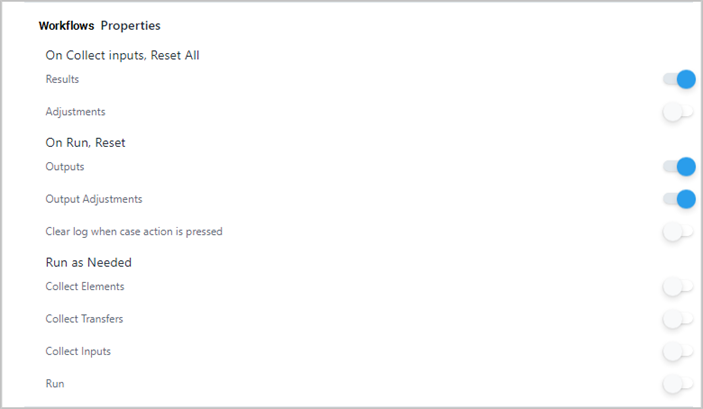
Workflows (Case Runner) Properties panel
 Note
NoteIn SFHub Admin please note that the name of this section is "Case Runner Properties."
See following paragraphs to determine which settings you want to use as the default properties whenever you select to run the Workflows (Case Runner) feature in SFHub Visualizer.
To enable a property option, click its
 white dot; the dot slides to the right and turns blue

To disable a property option, click its
blue
dot; the dot slides to the left and turns white
If you are finished configuring settings:
- SFHub Admin: Close the SfHubVisualizer Settings panel.
- SFHub Visualizer: Click on the SFHub Visualizer link at the top of the Settings panel.
Your setting is automatically saved.
Workflows (Case Runner) Properties Options
On Collect inputs, Reset All
By default, Visualizer disables the resetting of Results and Adjustments when you run the 'Collect Inputs" step. This setting allows you to enable resetting of Results and/or Adjustments.
| Setting | Description |
|---|---|
| Results | Input Results are reset. Input Results are not reset. |
| Adjustments | Adjustments on input Results are reset. Adjustments on input Results are not reset. |
It is good practice to enable the Reset Results and disable the Reset Adjustments.
On Run, Reset
By default,Visualizer disables the resetting of Results and Adjustments when you run the 'Run' step. This setting allows you to enable the resetting of Results and/or Adjustments.
| Setting | Description |
|---|---|
| Results | Output Results are reset. Output Results are not reset. |
| Adjustments | Adjustments on output Results are reset. Adjustments on output Results are not reset. |
| Clear log when Case action is pressed | The Case 'Log' is cleared when you perform any Casea ction. This option is disabled by default, though you can enable it if youwant . 'Log' is cleared when a Case action is performed. 'Log' is not cleared when a Case action is performed. |
It is good practice to enable the Reset Output Results
Run as Needed
The execution of a Case is a linear set of operations. If you click an option in the Case Runner that is later in the list (such as 'Publish'), then SFHub Visualizer automatically detects and runs any previous steps for which the 'Run as Needed' option is enabled.
| Setting | Description |
|---|---|
| Collect Elements | The 'CollectElements' step automatically runs. The 'CollectElements' step does not automatically run. |
| Collect Transfers | The 'CollectTransfers' step automatically runs. The 'CollectTransfers' step does not automatically run. |
| Collect Inputs | The 'CollectInputs' step automatically runs. The 'CollectInputs' step does not automatically run. |
| Run | The 'Run' step automatically runs. The 'Run' step does not automatically run. |