Localization Settings
The Localizations Settings section allows you to configure the default localization preferences or your own localization preferences.
Language Setting
The Language setting allows you to select the language to use as the default language in the SFHub Visualizer application.
English is the only language that is currently supported. Support for other languages will be added in a later version.
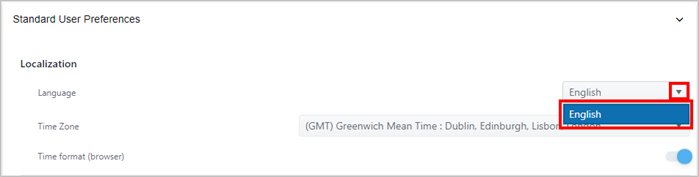
Under Localization, click on the language selection down-arrow and select the language you want used, as shown in the following figure.
Settings - Localization - Language
If you are finished configuring settings:
- SFHub Admin: Close the SfHubVisualizer Settings panel.
- SFHub Visualizer: Click on the SFHub Visualizer link at the top of the Settings panel.
Your setting is automatically saved.
Time-Zone Setting
SFHub Visualizer is a web-based application, and therefore uses the time-zone of the Server on which it is installed, for all displays and logs viewable in the application. SFHub Visualizer does include a Time-Zone setting that will eventually allow you to select the local time-zone as the default time-zone.
When you first log into SFHub Visualizer, the Time-Zone setting is required to be set.
To select a time-zone:
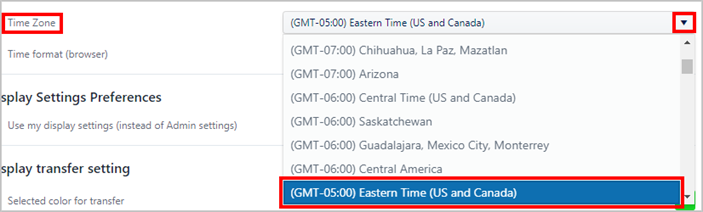
Under Localization, click on the Time Zone down-arrow and select your local time zone, as shown in the following example figure.
Settings - Localization - Language
If you are finished configuring settings:
- SFHub Admin: Close the SfHubVisualizer Settings panel.
- SFHub Visualizer: Click on the SFHub Visualizer link at the top of the Settings panel.
Your setting is automatically saved.
Time format (browser) Setting
The Time format (browser) setting allows you to set the time format (standard time or military time) according to the format of your browser in which the application is running. By default, this option is enabled; meaning the time format will mimic that of the browser. If you would prefer that the browser not be used for the time format, you can disable this feature.
To disable the time format feature:
Scroll down to the Localization section.
Localization - Time format (browser)

To enable/disable the Time format (browser) preference:
Disable the use of the browser Time format - click its
 blue dot; the dot slides to the left and turns white

Enable the use of the browser Time format - click its
white dot; the dot slides to the right and turns blue
If you are finished configuring settings:
- SFHub Admin: Close the SFHubVisualize Settings panel.
- SFHub Visualizer: Click on the SFHub Visualizer link at the top of the Settings panel.
Your setting is automatically saved.