Settings - Axis

The Series Setting is supported across all chart types except 'Circular' & 'Scatter'
The Axis sub-panel allows you to configure the X axis of the chart.

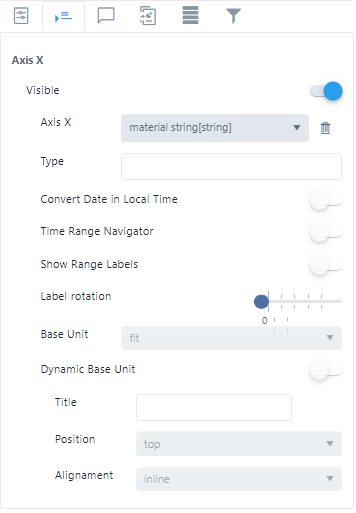
Visibility
Visibility allows you to toggle on or off the visibility of the text related to the X axis of the chart.
X Axis
X Axis allows you to configure the text to be shown on the horizontal axis of the chart (X axis). You can choose between the chart’s data source columns.
Click the trash can icon ( ) to remove a selection.
Type
?????????
Convert Date in Local Time
Convert Date in Local Time allows you to toggle on or off the date time values conversion, based on your time zone.
Show Range Labels
Show Range Labels allows you to toggle on or off the visibility of the range labels.
Label Rotation
Label Rotation allows you to rotate the X Axis texts from 0° to a 90° angle.
Base Unit
?????????
Dynamic Base Unit
?????????