Tools Options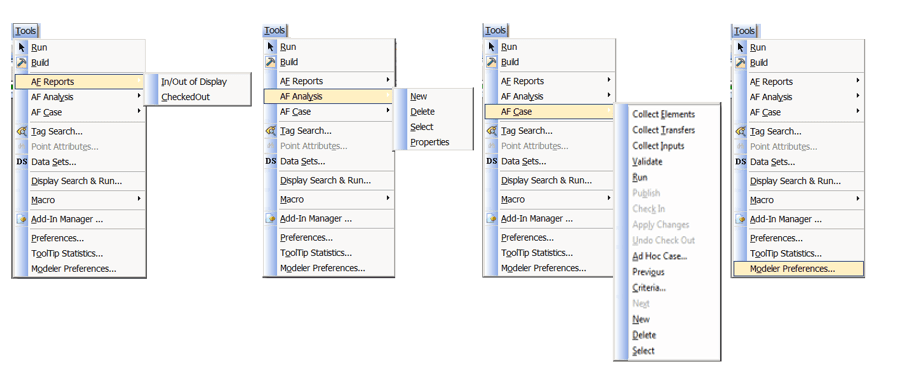
Tools Menu Options for Modeler
| Menu Options | Function |
|---|---|
| AF Reports | In/Out of Display |
| Checked Out | Opens the AF Output window and display the elements checked out (or dirty) of the current AF database. |
| AF Analysis | New |
| Delete | Deletes an existing Model analysis. |
| Select | Selects an existing Model analysis. |
| Properties | Open the Model Analysis Properties dialog box. |
| AF Case | Collect Elements |
| Collect Transfers | Locates any transfers to include in a case, based on the transfer s’ time and whether it is connected to any elements in the case. |
| Collect Inputs | Collects all inputs for the analysis to use in running the case. |
| Validate | Runs any pre-analysis validation steps. |
| Run | Runs the analysis for the current case. |
| Publish | Send output results of the analysis back to the attributes' configured data source. |
| Check In | Save the Case to the AF database. |
| Apply Changes | Applies changes for the selected case. |
| Undo Check Out | Undoes changes made to the Case since the last check in. This affects results, adjustments, and the Element collection, including transfers. |
| Add Hoc Case | Creates an ad hoc Case with the currently selected elements. |
| Previous | Click to display the previous case |
| Criteria | Opens the Case Search window to search for a Case and modify the search criteria for Cases displayed in the AF Analysis toolbar. |
| Next | Displays the next case. |
| New | Creates a new analysis case. |
| Delete | Deletes the current case. |
| Select | Opens the Cases window to select a case. |
| Properties | Opens the Case Properties window. |
| Modeler Preferences | Opens the Modeler Preferences window to specify default settings for the Sigmafine Modeler. |