Using the AF Analysis Toolbar
The Analysis Toolbar provides operations for creating, navigating, and executing AF Analyses and cases. These operations are described in the AF Analysis Toolbar Options table. The AF Analysis toolbar becomes visible when ProcessBook is in the 'Run' mode and you are viewing a display that is associated with a model.
Displaying the AF Analysis Toolbar
To display the AF Analysis toolbar if it is not visible:
Select View > Toolbars from the main menu.
The Customize window opens.
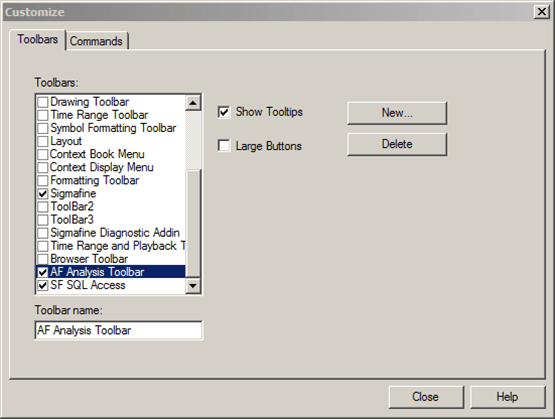
On the Toolbars tab, check the AF Analysis Toolbar checkbox.
A check indicates that the options displays on the toolbar.
Click Close to save your selection and close the Customize window.
The AF Analysis Toolbar displays.
Figure 746" AF Analysis Toolbar
AF Analysis Toolbar Options
The following table provides the function for each option on the AF Analysis Toolbar.
AF Analysis Toolbar Options
| Icon or Input Box | Menu Bar Option | Functions |
|---|---|---|
| Tools > Build | Builds Mode pointer. Most of the functions used for building a ProcessBook require the Build Mode. Provides access to symbols and formatting tools. | |
| Tools > AF Analysis > Select | Selects an existing Model analysis. | |
| Tools > AF Analysis > Properties | Opens the Model Analysis Properties window. | |
| Tools > AF Analysis > New | Creates a new Model analysis. | |
| Tools > AF Case > Previous | Displays the previous case. | |
| Tools > AF Case > Criteria | Opens the Case Search window to search for case. | |
| Tools > AF Case > Next | Displays the next case. | |
| Tools > AF Case > Select | Selects an existing analysis case. | |
| Tools > AF Case > Properties | Opens the Case Properties window. | |
| Tools > AF Case > New | Creates a new analysis case. | |
| Tools > AF Case > Check In | Checks in changes made to a case. | |
| Tools > AF Case> Apply Changes | Applies changes made to a case. | |
| Launches SF SQL Access Client application. | ||
| Publishes Case data on SF SQL Access database. |
Note: Refer to the Sigmafine SQL Access 4.7.0 – User Manual for information regarding the Sigmafine SQL Access Client application.