Resetting Case Results
You can choose to reset inputs, outputs, the value of a single attribute, or all these on the Case Results tab.
Note: A reset deletes values recorded in the case.
To reset the Case results:
- Open the AF Output window.
- Click on the Results tab.
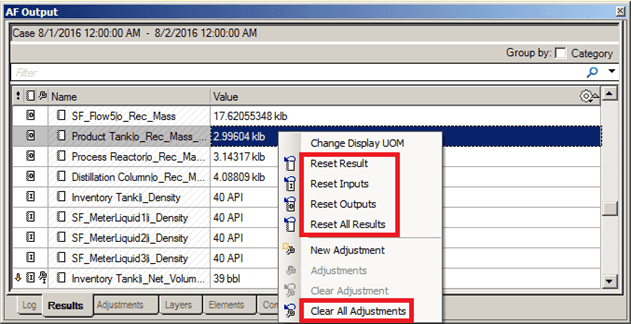
- Use the following table to select the reset option you want to use.
Reset Results Options
| Option | Description |
|---|---|
| Reset Result | If the value of an Attribute is questionable, you can reset the attribute. After modifying the source of the error, collect inputs again. It is possible to reread a single Attribute value with this option. |
| Reset Inputs | If some or all inputs have changed since they were first collected, then click Reset Inputs to delete existing values prior to rereading the input sources again. You can also reset inputs to reduce the size of the Case file before saving the case. The original values that were read during the Collect Inputs phase of the analysis are not affected. However, to rerun the case, you need to collect the inputs again. |
| Reset Outputs | Values of some outputs may affect the values of others. Reset outputs to ensure that the Case analysis uses only the latest values to generate results |
| Reset All Results | Resets all the inputs and outputs of the case. |
| Clear All Adjustments | Removes all the ‘Adjustments’ of the case. After that a “Reset Results’ can be done to remove all the Inputs and Outputs as well. |