Customizing a Case
The customization features in the Case Properties window allow you to remove layers, elements and connections from a case.
To customize a case:
- To remove one or more layers from consideration in this analysis case:
- Click the Layers tab.
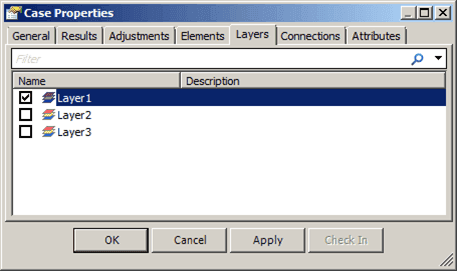
- Remove the check from any layer you do not want considered in this Case analysis.
- Do one of the following:
If you have other customizations to make, click the Apply button.
This saves your changes, but leaves the Case Properties window open.
If this is the only customization you want to perform, click the OK button.
This saves your changes and closes the Case Properties window.
- To prevent one or more elements from being considered in this analysis case:
- Click the Elements tab:
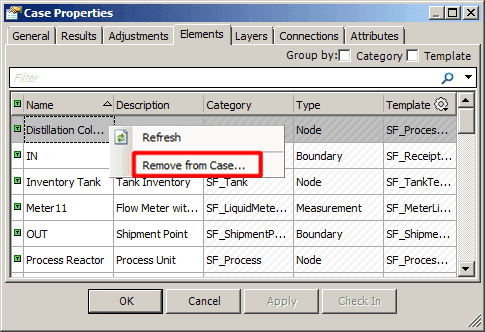
- Right-click on an Element and select Remove from Case.
- Do one of the following:
If you have other customizations to make, click the Apply button.
This saves your changes, but leaves the Case Properties window open.
If this is the only customization you want to perform, click the OK button.
This saves your changes and closes the Case Properties window.
- To prevent one or more connection from being considered in the case:
- Click on the Connections tab.
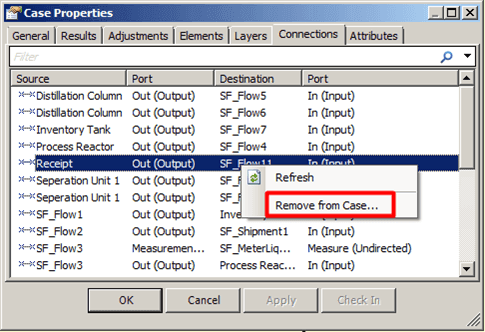
- Right-click on a connection Element and select Remove from Case.
- Do one of the following:
If you have other customizations to make, click the Apply button.
This saves your changes, but leaves the Case Properties window open.
If this is the only customization you want to perform, click the OK button.
This saves your changes and closes the Case Properties window.