Creating a New Case
To create a new case:
Open Modeler.
On the Analysis Toolbar, select the Analysis for which you want to create a new case.
Click the New Case icon.

The Case Properties window opens.
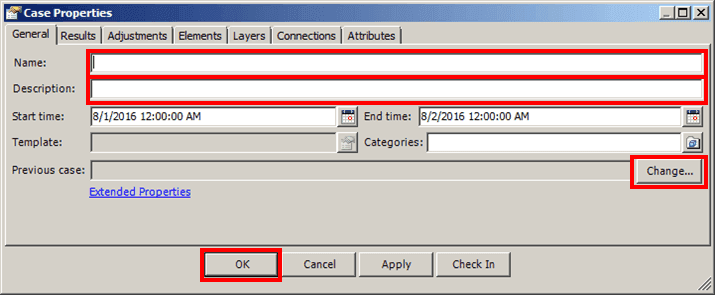
In the Name box, type a name for the new case.
(Optional) In the Description box, type a short description for the case.
If a previous Case exists, it is displayed in the Previous Case box. The Sigmafine Modeler automatically uses the previous Case for choosing the layers to include in this case. Some analysis rule or data reference might use the previous Case to obtain data.
(Optional) In the rare event that you need to change the previous case, click the
 Change button and use the 'Case Search' window to select a case.
Customize the Case as necessary, using the steps and information found under Customizing a Case.
If you are ready to run the Case analysis, click OK to close the Case Properties window.
The new Case appears in the AF Analysis toolbar, as shown in the following figure.
