Change the Monitoring Flag
The Change Monitoring Flag feature allows you to modify the monitoring flag of the selected tank, as either 'True' or 'False'.
If the tank monitoring flag is set to ‘True’, the tank’s associated tag information is synchronized with the Tank Monitoring Plugin and constantly updated (i.e. icon with tank transfer direction, status, delta stock ecc.).
To modify the monitoring flag:
Open the Tank dockable window.
From the IMM Toolbar, click on the
 Tank button.
Right-click on the tank for which you want to change the monitoring flag.
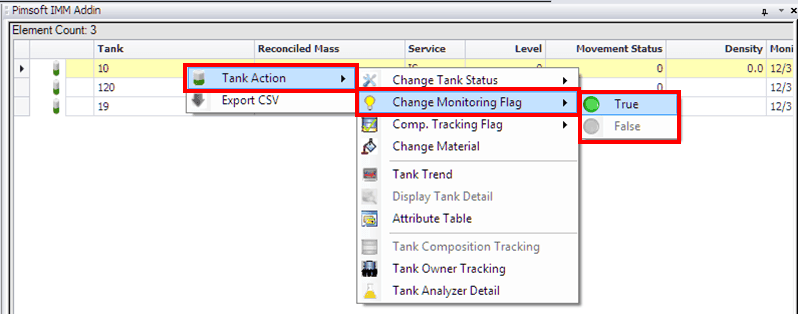
Select Tank Action > Change Monitoring Flag and then select True or False.