Set Up an Analysis Period Re-Execution
The Sigmafine Scheduler Configuration Tool provides an Execute feature that allows you to set up the re-execution of an entire period of a selected analysis. This feature is accessible from the Scheduler Table area of the Scheduler Configuration Tool window.
Prior to setting up an analysis period re-execution, please review the following:
- The re-execution engine works even if the standard execution is disabled and the overall database automatic execution is disabled.
- The re-execution engine is "circular recalculations aware," meaning that it breaks up any un-direct chain of dependency.
- If the instance of the execution is not set or it is stopped/unavailable for the recalculation, an error message is displayed.
To set up an analysis period re-execution:
In the Scheduler Table list of analyses, click on the analysis period for which you want to set up a re-execution. This action selects the analysis period.
Click the Execute button to open the Sigmafine Scheduler Execute Analysis window.
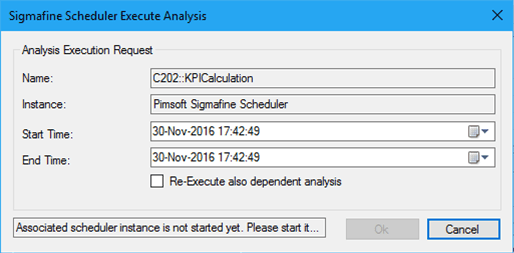
The Name and Instance boxes are automatically populated, based on your selection, and cannot be changed.
Click on the Start Time down-arrow and select the starting date and time for the period you want to re-execute.
Alternatively, click on the Calendar button and select the date and time period from a calendar.
Click on the End Time down-arrow and select the ending date and time for the period you want to re-execute.
Alternatively, click on the Calendar button and select the date and time period from a calendar.
If you want Scheduler to recalculate all the dependent analyses, check the Re-Execute also dependent analysis checkbox.
 EXAMPLE: Configuration in which re-execute dependent analyses is useful
With the following configuration, if the 'Re-Execute also dependent analysis' checkbox is checked ...
ANALYSIS DESCRIPTION MOD1::BALANCE MOD1::POSTBALANCE MOD1::BALANCE MOD1::KPYCALC MOD1::BALANCE;MOD1::POSTBALANCE the Scheduler re-executes all the cases of the analyses POSTBALANCE and BPYCALC impacted by the recalculation period set for MOD1::BALANCE.
Click OK to save your setup and close the window.