Scheduler (Analyses) Table
The Scheduler Table area of the Scheduler Configuration Tool allows you to review and select the analyses, from the target database, for configurations.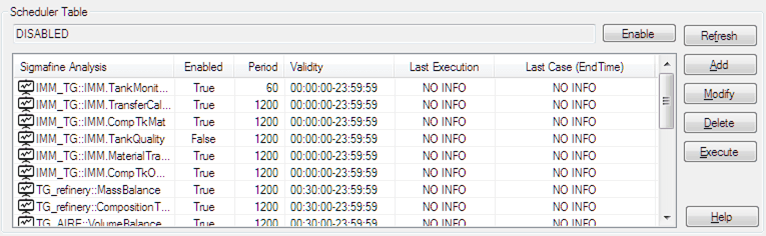
The Schedule Table area includes a feature that allows you the enable and disable the Sigmafine database for global execution, an Analysis List which holds the analyses from which you can select, and a set of action buttons.
Scheduler Table Columns
The Scheduler (Analyses) Table lists the following basic information about the configuration of automatic analyses execution.
- Name: Name of the analysis.
- Enabled: Indicates whether the analysis is enabled for execution.
- Validity: Displays the validity period (hh:mm:ss start and end time format) of the analysis.
- Last Execution: Displays the last time the analysis was executed. "NO INFO" indicates that the analysis has never been executed.
- Last Case: Displays the End Time of the last case. If an analysis has never been executed, this column displays "NO INFO".
Scheduler Analysis Action Buttons
The following provides a brief description of the analysis actions available in the Scheduler Table area.
- Enable (Disable): A toggle that allows you to enable or disable the Sigmafine database for global execution.
- Add: Allows you to create a new analysis scheduling configuration.
- Modify: Allows you to modify an existing scheduling configuration.
- Delete: Allows you to delete an existing scheduling configuration.
- Execute: Allows you to execute an existing scheduling configuration.
For further details and instructions on these actions, please see: