Scheduler Instances
The Scheduler Instances area of the Scheduler Configuration Tool allows you to manage Sigmafine Scheduler "instances," which are multiple parallel processes for Scheduler executions. With this feature, a Sigmafine administrator can group an analysis in a bunch of executions spreading the workload of the Sigmafine Server. This practice results in better overall system performance. In case where you have a standard of 2 or 3 analyses, a daily scheduling of one instance in enough. However, the case where Sigmafine needs to execute many analyses (more than 10) with a frequency in the order of minutes, instances can be a good solution.
Rules to Follow for Defining Multiple Instances
The following are some important rules to keep in mind when defining multiple instances:
Define a new instance set when there are 2 sets of analyses for the same Sigmafine database:
The first set is to include the analyses that should run every hour or every day
The second set is to include one or more analyses that should run every 5 minutes or less
Define a new instance if you want to segregate the execution of group of analyses,. For example, if an administrator stops the execution of one set of analyses, the other groups managed by other instances can continue to run without any issues.
Define more instances if you know that there is no inter-dependency among analyses scheduled and executed by different instances.
Define more instances if you want to segregate the execution of different platforms (x86 and x64). The execution over different platforms is carried out without the specific need for multiple instances. However, there are some special cases in which it is mandatory to segregate the execution.
Define more instances if you are experiencing poor performance issues or you want to segregate the standard execution against the recalculation or the re-execution of the analysis.
Define more instances when the execution time of one or more analyses can affect the standard execution times of others. For example, you have one database with the following situations:
Model "A"
Analysis 01 execution time = Scheduled every 5 minutes, execution time 30 seconds
Analysis 02 execution time = Scheduled every 60 minutes, execution time 60 seconds
Model "B"
Analysis 10 execution time = Scheduled every 60 minutes, execution time 3 minutes
Analysis 20 execution time = Scheduled every 60 minutes, execution time 5 minutes
Analysis 30 execution time = Scheduled every 60 minutes, execution time 2 minutes
In this situation, the analysis “MODEL B::20” is taking 5 minutes for being executed. If you are running a unique instance of Sigmafine Scheduler, this configuration leads that the main scheduler engine is not capable to fulfill the need for running “MODEL A::01” every 5 minutes.
Note: Sigmafine Scheduler has a predefined/default instance name called “PIMSOFT SIGMAFINE SCHEDULER” with a corresponding executable file name called “PIMSOFT.SIGMAFINE.SCHEDULER.EXE”. This predefined/default instance name cannot be changed or deleted in any case.
Scheduler Instances List
The Scheduler Instances area contains a list, referred to as the "Scheduler Instances List," that provides basic information about the instances defined in the Sigmafine server. The list specifically displays the Instance Name, Execution Name and TCP/IP Port used for the execution of each instance.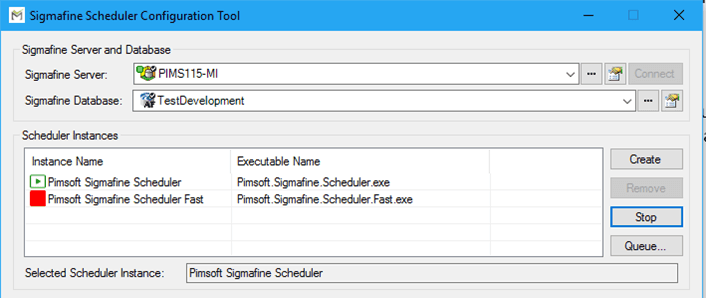
The Scheduler Instances list displays 2 icons that show the current status of each instance. The green icon indicates that the Sigmafine Scheduler instance is currently running, while red icon indicates that the instance has stopped (meaning, that there is no automatic calculation for those analyses configured to run under the instance).
When selecting an instance, the tool highlights the selection by replicating the name of the actual selected instance below the list in the Selected Scheduler Instance box, as shown in Figure 1030.
The following topics provide details on how to work with the Scheduler Instances.