Locating Transfers
You can search for a particular transfer in a display in the 'Run' mode.
To search for (locate) a transfer:
In Modeler, select Edit > Find AF Transfer from the main menu.
The Transfer Search Criteria window opens.
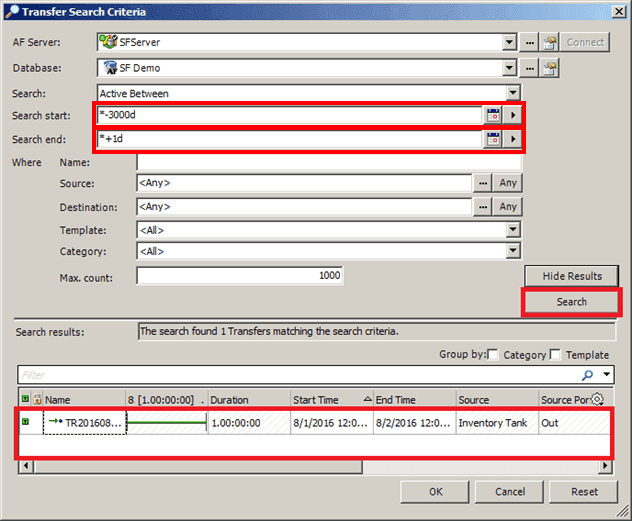
Select or enter the search criteria you want to use.
Because you are attempting to locate transfers, you should at least enter Search start and Search end criteria.
Click the Search button.
All transfers meeting the criteria you have entered ,appear in the Search Results box, as shown at the bottom of Figure 889.
In the Search results pane, select the transfer that you want to locate in the display.
Click OK to save your selection and close the Transfer Search Criteria window.
The transfer is highlighted in the display, as shown in the following figure.

(Optional) If you System Explorer installed, you can also locate transfers in the System Explorer tree view as shown in the following figure.
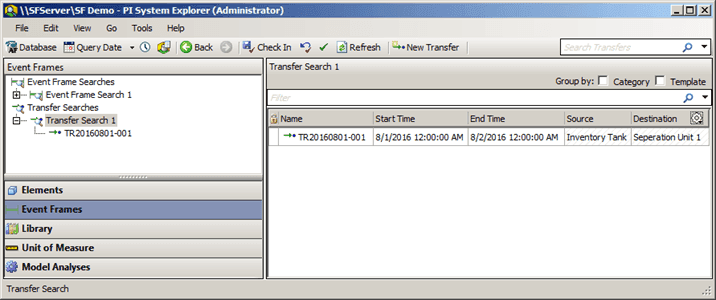
In the navigation pane, click on Event Frames.
In the Event Frames tree, click on Transfer Searches.
Look through the list to locate the transfer you want.