Custom UOMs for Transfers
In some situations, the Units of Measure that need to be imported to Sigmafine are not the ones being used by the Attribute in the Transfer. When this type of scenario occurs, you can create Custom UOMs.
For example, let’s suppose you need to import the following data to Sigmafine for Transfers TR1X1X and TR1X2X.
You are importing 4540 kilograms to Transfer TR1X1 and 714.2857 ston to TRX2X.
After the import, the log file would show as follows: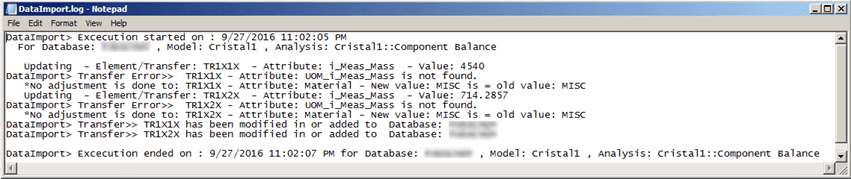
However, when checking Transfer TR1X1X, in System Explorer, you can see that an Adjustment was made: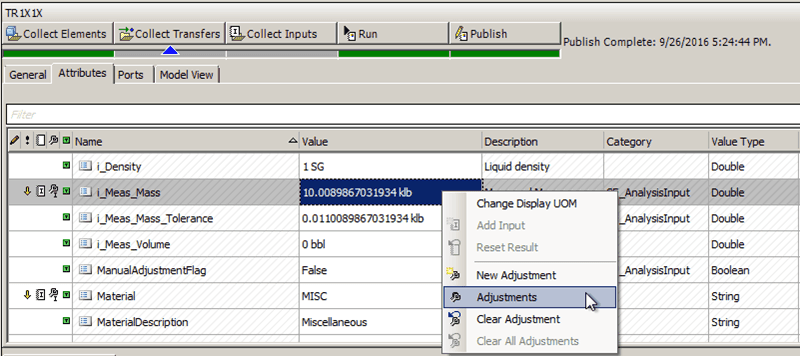
If you right-click on the adjusted 'Value' and select Adjustments, not only Custom UOM is displayed, but also the Comments (as shown in the following figure).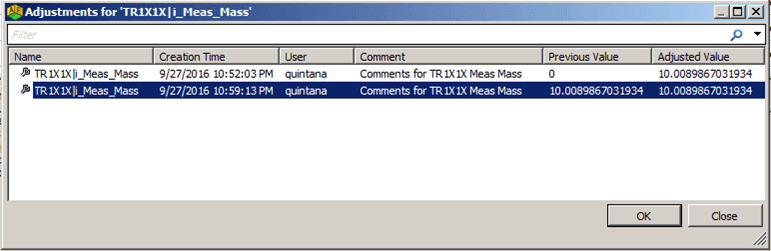
IMPORTANT: In order for Adjustments, Custom UOMs and Editable Comments to display in the results, you must have the Adjustment checkbox 'checked' in the Data Importer configuration window, prior to initiating the import.